 OxyGram (Android)
OxyGram (Android)

💛 Support Page Telegram directly
💳 Donate
Current Version: 1.0.0
29
Unique Views
7
Free Downloads
0
Donation Downloads
OxyGram
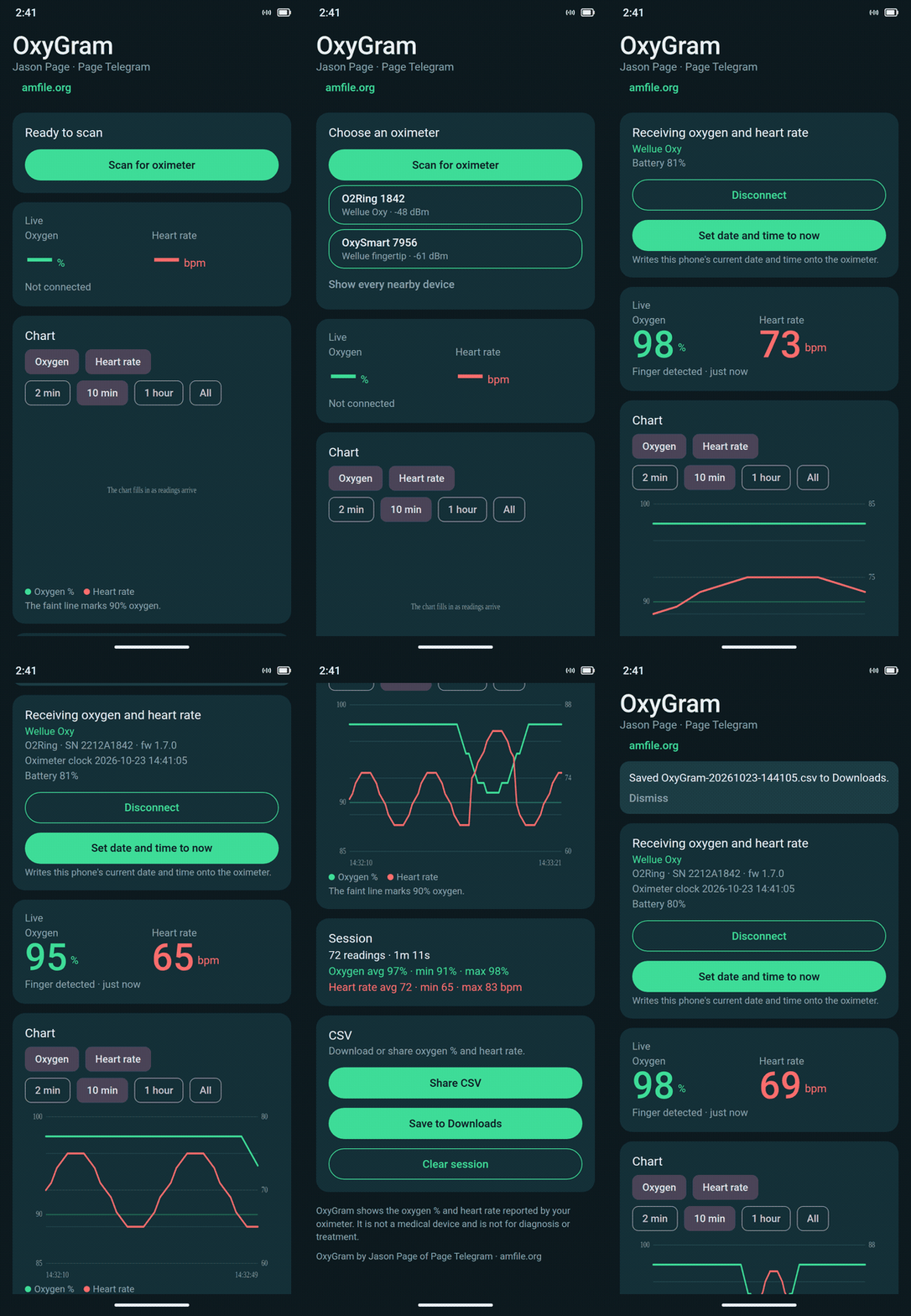
OxyGram reads oxygen % and heart rate from a Wellue oximeter over Bluetooth Low Energy, charts both series, and lets you share or save the session as CSV. By Jason Page of Page Telegram. amfile.org OxyGram is not a medical device. It is not for diagnosis or treatment. It shows the numbers the oximeter reports. Wellue, Viatom, O2Ring, and Checkme are trademarks of their owners. OxyGram is an independent app.What it does
- Scans for a nearby Wellue oximeter and connects without pairing in Android Bluetooth settings.
- Shows live oxygen % and heart rate.
- Charts both series, with a 90% oxygen guide. Choose 2 minutes, 10 minutes, 1 hour, or the whole session.
- Shares a CSV, or saves it to Downloads.
- Sets the oximeter date and time to the phone's current date and time, on models that accept a clock command.
Oximeters
| Oximeter | How OxyGram talks to it | Set clock |
|---|---|---|
| O2Ring, Checkme O2, KidsO2, SleepO2, RingO2, O2 Max | Viatom Oxy protocol | Yes |
O2Ring-S (T8520), including names like T8520_… or S8-AW | OxyII protocol | Yes |
| PC-60FW fingertip, often named OxySmart | Nordic UART, live numbers only | No. Rows use the phone clock |
CSV
text
time,oxygenpercent,heartratebpm,batterypercent
Build
Android Studio (JDK 17 or 21) can open this folder and run theapp configuration.
From a terminal, with the Android SDK installed:
bash
export JAVA_HOME=/path/to/jdk-21
export ANDROID_HOME=$HOME/Android/Sdk
bash ./gradlew :app:assembleDebug :app:testDebugUnitTest
JAVA_HOME must be a JDK that includes javac. A JRE is not enough. If ./gradlew reports "Permission denied", the project folder is on a filesystem that will not execute scripts; bash ./gradlew still works.
The debug APK is app/build/outputs/apk/debug/app-debug.apk.
local.properties points at the SDK on this machine. Android Studio rewrites that file if you open the project somewhere else.
Permissions
Android asks for nearby-device access (Bluetooth). On Android 12 and earlier it also asks for location, because that is how those versions expose scanning. Notifications let the recording continue on the lock screen. OxyGram does not use the network.Download Options
Free Downloads: Source code and compiled binaries are freely available. Donations are appreciated!
Free Downloads
Compiled Binaries (Free Download)
💛 These binaries are free! If you find this software useful, please consider supporting the developer.
💳 Donate
Android
Changelog
No changelog available.