 FoodGram (BASH)
FoodGram (BASH)

💛 Support Page Telegram directly
💳 Donate
Current Version: 1.0.0
28
Unique Views
12
Free Downloads
0
Donation Downloads
FoodGram by Page Telegram Volunteer Services
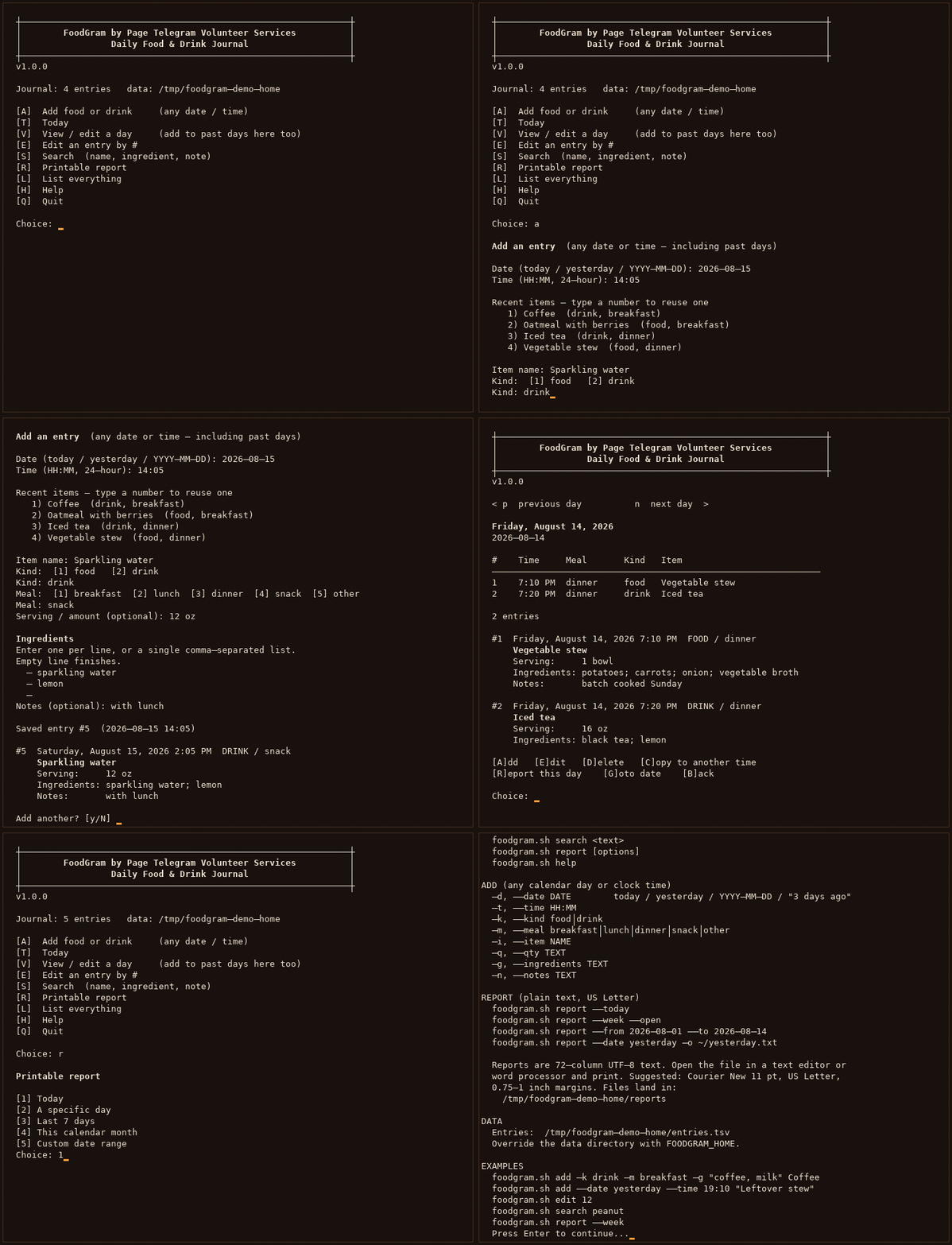
!FoodGram demo A terminal food-and-drink journal written in Bash. Log what you ate or drank on any date and time (including days already past), edit or add to earlier entries, record ingredients, and write a plain-text report you can open and print from a text editor or word processor. Current version: v1.0.0 — see CHANGELOG.md for release notes.
  +--------------------------------------------------------------+
  |        FoodGram by Page Telegram Volunteer Services          |
  |                 Daily Food & Drink Journal                   |
  +--------------------------------------------------------------+

  [A]  Add food or drink     (any date / time)
  [T]  Today
  [V]  View / edit a day     (add to past days here too)
  [E]  Edit an entry by #
  [S]  Search  (name, ingredient, note)
  [R]  Printable report
  [L]  List everything
  [Q]  Quit
Requirements
| Tool | Purpose |
|---|---|
bash 4+ | Script host |
date (GNU) | Dates, times, “yesterday”, “3 days ago” |
fold | Word-wrap in reports (optional; lines still print without it) |
flock | Safe writes if two copies run at once (optional) |
Run
bash
chmod +x foodgram.sh
./foodgram.sh
bash
bash foodgram.sh
bash
bash foodgram.sh --help
bash foodgram.sh add -k drink -m breakfast -g "coffee, milk" Coffee
bash foodgram.sh report --week --open
Add an entry
You can file something for right now, or back-date it to any earlier clock time or calendar day. Interactive (prompts for date, time, kind, meal, item, serving, ingredients, notes):bash
./foodgram.sh add
bash
./foodgram.sh add -k drink -m breakfast -g "coffee, half-and-half" Coffee
./foodgram.sh add --date yesterday --time 19:10 --meal dinner \
--qty "1 bowl" --ingredients "beef, potatoes, carrots, onion" \
--notes "leftovers from Sunday" "Stew"
| Flag | Meaning |
|---|---|
-d, --date | today, yesterday, YYYY-MM-DD, or a GNU date phrase (3 days ago) |
-t, --time | 24-hour HH:MM (default: now) |
-k, --kind | food or drink |
-m, --meal | breakfast lunch dinner snack other |
-i, --item | Name (leftover words on the command line also become the name) |
-q, --qty | Serving / amount |
-g, --ingredients | Comma- or semicolon-separated list |
-n, --notes | Free text |
Ingredients
Ingredients are their own field — not buried in the notes.- One ingredient per line, or a single comma-separated list
- A blank line ends the list
- Stored and printed as a proper list on the report When you edit an entry, the current ingredient line is pre-filled (readline). Type
. on that line to re-enter them one per line.
Edit and add to prior days
Nothing is locked to “today.”| Action | How |
|---|---|
| Add to a past day | ./foodgram.sh add --date yesterday or [V] View / edit a day → [A]dd |
| Change an entry | ./foodgram.sh edit 12 or pick from a day’s list |
| Move an entry to another time/day | Edit it; date and time are normal fields |
| Delete | ./foodgram.sh delete 12 (asks to confirm) |
| Repeat an old item later | ./foodgram.sh copy 12 today 08:15 or [C]opy in the day view |
bash
./foodgram.sh today
./foodgram.sh list yesterday
./foodgram.sh list all
./foodgram.sh view 2026-08-10
./foodgram.sh search peanut
Printable report
Reports are plain UTF-8 text, 72 columns wide — a comfortable line length for US Letter (8.5 × 11 in) with about a 1-inch margin in a 12-point monospaced font. No PDF, no HTML: open the file and print.bash
./foodgram.sh report # menu: today / day / week / month / range
./foodgram.sh report --today
./foodgram.sh report --date yesterday
./foodgram.sh report --week --open
./foodgram.sh report --month
./foodgram.sh report --from 2026-08-01 --to 2026-08-14
./foodgram.sh report --from 2026-08-01 --to 2026-08-14 -o ~/August-food.txt
./foodgram.sh report --stdout # print to the terminal only
data/reports/:
data/reports/FoodGram-2026-08-15.txt
data/reports/FoodGram-2026-08-08to2026-08-15.txt
Printing from a text editor
.txt file (Mousepad, gedit, nano, Vim, …).
Printing from a word processor
.txt in LibreOffice Writer or Microsoft Word.
--page-breaks inserts a form-feed between days; some editors and printers treat that as a new page.
--open launches $FOODGRAM_EDITOR, then $VISUAL / $EDITOR, so you can land straight in the editor you print from.
Data
The journal is a tab-separated file next to the script (so a copy on pCloud keeps the log):
data/entries.tsv
data/reports/
bash
export FOODGRAM_HOME="$HOME/Documents/FoodGram"
./foodgram.sh
id, date, time, kind, meal, item, quantity, ingredients, notes. You can open entries.tsv in a spreadsheet if you want a raw dump.
Commands
foodgram.sh                      Interactive menu
foodgram.sh add [options] [item]
foodgram.sh edit  [id|date]
foodgram.sh delete [id|date]
foodgram.sh copy <id> [date] [time]
foodgram.sh list [date|all|week]
foodgram.sh today
foodgram.sh search <text>
foodgram.sh report [options]
foodgram.sh view [date]
foodgram.sh help
Demo GIF
The animation at the top is a scripted session: add a drink (with ingredients), browse today and yesterday, search, and print a Letter-width report. Rebuild it with:bash
python3 -m venv --system-site-packages /tmp/foodgram-demo-venv
/tmp/foodgram-demo-venv/bin/pip install pyte
/tmp/foodgram-demo-venv/bin/python tools/record_demo.py
FOODGRAM_HOME; it does not touch data/entries.tsv.Download Options
Free Download: Source code is freely available below.
Compiled Versions: Support development with a PayPal donation.
Free Downloads
📦 Download Source CodeChangelog
Changelog
All notable changes to FoodGram are documented here. Format follows Keep a Changelog. Versioning follows Semantic Versioning.[1.0.0] — 2026-08-15
First public release. FoodGram by Page Telegram Volunteer Services.Added
- Interactive Bash menu for a daily food-and-drink journal.
- Add food or drink for any date and time, including days already past (
today,yesterday,YYYY-MM-DD, GNU date phrases). - First-class ingredients field: one per line or a comma-separated list; stored and printed separately from notes.
- Edit, delete, and copy entries; date and time are normal fields so an item can be moved to an earlier day.
- Day browser (
[T]today,[V]any day): previous / next day, jump to a date, add to that day, edit, delete, copy, or write that day’s report. - Recent-item shortcut when adding, so a usual coffee or breakfast is a number.
- Search across item name, ingredients, and notes.
- Printable 72-column UTF-8 reports grouped by day and meal, sized for US Letter (8.5 × 11 in).
- Report ranges: today, a chosen day, last 7 days, calendar month, or
--from/--to. - Multi-day reports include totals and an index of foods and drinks.
--page-breaksform-feeds between days;--openlaunches$FOODGRAM_EDITOR/$VISUAL/$EDITOR.- CLI:
add,edit,delete,copy,list,today,search,report,view,help,version. - Journal stored as
data/entries.tsvnext to the script (override withFOODGRAM_HOME). - Branding on the banner, help, version line, and printed reports: FoodGram by Page Telegram Volunteer Services.
- Animated terminal demo (
docs/foodgram-demo.gif), recorded bytools/record_demo.py. - Requires Bash 4+ and GNU
date. Optional:fold(wrap),flock(write lock). - On pCloud / FUSE mounts the execute bit may not stick; run
bash foodgram.sh.