 JukeGram (BASH script)
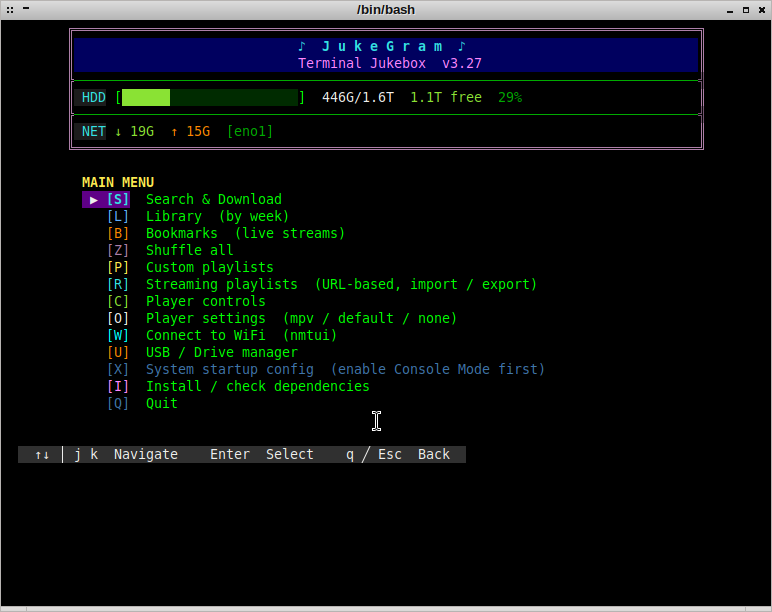
JukeGram (BASH script)

💛 Support Page Telegram directly
💳 Donate
Current Version: 3.2.7
27
Unique Views
11
Free Downloads
0
Donation Downloads
JukeGram
A full-featured terminal jukebox written in Bash. Search YouTube, YouTube Music, SoundCloud, Odysee, Dailymotion, Rumble, any PeerTube instance, or a custom site; stream or download tracks; manage a local library by week; create multi-format custom playlists (M3U, PLS, XSPF, …); build URL-based streaming playlists; and play music — all from a navigable TUI. Current version: v3.27 — see CHANGELOG.md for release notes.
╔══════════════════════════════════════════════════════╗
║           ♪  J u k e G r a m  ♪                     ║
║              Terminal Jukebox  v3.27                 ║
╚══════════════════════════════════════════════════════╝

  MAIN MENU

  ▶  [S]  Search & Download
     [L]  Library  (by week)
     [B]  Bookmarks  (live streams)
     [Z]  Shuffle all
     [P]  Custom playlists
     [R]  Streaming playlists  (URL-based, import / export)
     [C]  Player controls
     [O]  Player settings  (mpv / no_video / none)
     [W]  Connect to WiFi  (nmtui)
     [U]  USB / Drive manager
     [X]  System startup config
     [I]  Install / check dependencies
     [Q]  Quit
Features
- Multi-site search — default is YouTube; also YouTube Music, SoundCloud, Odysee (LBRY), Dailymotion, Rumble, PeerTube (any instance host), or a custom yt-dlp prefix / URL template (
{q}= encoded query); history and cache are site-aware - YouTube search — query yt-dlp, browse 10 results with title, duration, and uploader; live streams are tagged
[LIVE]in the results list; upload date is fetched and stored per result - Playlist search — from within any search result screen, select "📋 Search playlists: \<query\>" to switch to a playlist-only search; results list playlist title and channel; each playlist can be downloaded in full (MP3 HQ/STD, Video 320p/720p/1080p) or streamed audio-only
- Full playlist download — download every track in a YouTube playlist to a named subfolder inside the current week's library directory (
YYYY/Week_NN/<playlist-title>/); output is prefixed with the playlist index for correct ordering; the subfolder appears in the Library browser alongside regular week folders - Upload date display and logging — every stream and download shows the original video's upload date (
YYYY-MM-DD) on screen; a persistent access log (~/.jukegramstreamlog) records each stream/download with timestamp, action type, upload date, title, and URL - Stream quality selection — stream at 320p (mobile), 480p (default), or 1080p (Full HD)
- Audio-only streaming — stream best available audio with no video window via "♪ Stream audio only" in any stream action menu
- Stream buffering — mpv pre-buffers network streams to prevent stutter; buffer depth (10 s / 30 s / 60 s / 120 s) is configurable in Player Settings; uses mpv cache with pause-on-underrun so playback resumes smoothly rather than glitching
- Live stream bookmarks — search results identified as live streams show a "★ Bookmark this live stream" option; bookmarks are saved persistently and accessible from
[B] Bookmarksin the main menu; each bookmark can be played at any quality (including audio-only) or removed; press[B](uppercase) on the now-playing screen to instantly bookmark the current stream without opening any sub-menu - Quick bookmark from now-playing —
[B](Shift+B) while a stream is playing immediately saves it to bookmarks; reads the current URL live from mpv IPC; does nothing for local files;[b]lowercase still goes back - Auto-download + add to last playlist —
[P]on the now-playing screen (and the "⬇+★" action in search results) downloads the current stream using the configured default format and automatically appends the saved file to the most recently used playlist; if no last playlist is known, a playlist-picker opens immediately after the download so the file is never left unassigned - Batch download from search results — press
Spaceon any search result to toggle it selected (● green / ○ unselected); once one or more items are marked, pressDto open a format picker and download all selected tracks in sequence; progress is shown as[N/total]with a ✔/✘ per track; selections are cleared after the batch completes; pressingEnteron any result still opens the normal single-item action menu unchanged - Last-playlist tracking — JukeGram remembers the last playlist you played or added a track to; the
[P]key uses this automatically so no manual selection is needed - Streaming playlists — URL-based playlists (
[R]) stored as.splfiles; hold YouTube links, live stream URLs, or any direct media URL; independent of the local custom playlist system; create, edit, play, shuffle, and delete entries; add tracks directly from the last search results without leaving the playlist editor - Import / export streaming playlists — export any streaming playlist to a portable
.jkplfile (human-readable, tab-separated); import on another JukeGram instance by pointing to the file path; format is validated by a#JUKEGRAMSPLV1header before import - Export to mpv-compatible M3U — export any custom playlist, streaming playlist, or bookmarks list as an
#EXTM3Ufile compatible withmpv --playlist=<file>; available in the manage menu for all playlist types - Add / bookmark from now-playing screen — press
[a]while any track is playing to save or queue it: streaming URLs offer "★ Bookmark" or "✚ Add to streaming playlist"; local files offer "✚ Add to custom playlist"; reads the current path live from mpv IPC so it works mid-playlist - Download options — 5 formats: MP3 HQ (~320kbps VBR), MP3 STD (~128kbps), Video 320p/720p/1080p
- Weekly library — tracks organized under
~/Music/JukeGram/YYYY/Week_NN/ - Stay in folder — after playing or acting on a track, the library returns to that week's folder
- Shuffle all — play the entire library in random order
- Custom playlists — create, edit, add/remove tracks, play or shuffle; supports M3U/M3U8, PLS, XSPF, ASX (and JukeGram SPL/JKPL); import external files; open external paths/URLs; entries may be local files or stream URLs; HLS
.m3u8plays as a single stream - Media management — delete individual tracks or multi-select bulk delete from the library; delete files from disk directly in the playlist editor
- USB / drive manager — list, mount, unmount drives; browse and play music directly from removable media
- USB media migration — copy or move tracks from removable media into the library; multi-select import with copy/move choice and destination week picker
- Multiple player engines — mpv (default), mplayer, ffplay, vlc
- Video modes — GPU window, audio-only, ASCII art (
--vo=tty), colour ASCII (--vo=caca/ libcaca), framebuffer DRM (fb_video) - Framebuffer video (
fb_video) — renders video via DRM/KMS (--vo=drm) with no X11 required; works on bare TTYs, Raspberry Pi, and headless systems; X11 screen flags are automatically suppressed so mpv does not conflict between X11 and DRM mode - Visualizers — cava spectrum bars, mpv waveform (
showwaves), mpv vector scope (avectorscope) - Output device control — select which screen video plays on (multi-monitor, including "All displays" span), and which audio device to use (HDMI, audio jack, PulseAudio/PipeWire)
- TAB / Backspace track skip — during shuffle or playlist playback,
Tabskips to the next track andBackspacereturns to the previous; works on macOS and Linux keyboards - Full transport controls — on the now-playing screen and
[C] Player controls:Spacepause/resume, arrow keys seek (±10 s / ±60 s),+/-volume,mmute; live progress bar with time and volume via mpv IPC - Storage bar in header — live disk-usage bar (used / free / total + colour-coded block bar) shown in the header on every screen
- Network & battery in header — active interface RX/TX byte counters and battery level (with charge state) shown in the header; battery colour-codes green / yellow / red by charge level
- Search result caching — results for the last 5 site+query pairs are cached to disk; re-selecting a history entry is instant (⚡); new searches and explicit refresh re-fetch from the active site (⟳)
- yt-dlp upgrade — one-click upgrade in the Install / check dependencies menu; auto-detects pacman (Arch), pipx, or pip3
- Console mode — disables all X11-requiring options; safe on headless systems and TTYs
- System startup config — toggle auto-login on TTY1 and auto-launch JukeGram on boot (console mode only)
- WiFi — launches
nmtuifor NetworkManager-based WiFi management - Dependency installer — checks, installs, and upgrades all packages individually so a single failure does not abort the rest; supports Debian Sid, Ubuntu, and Arch Linux; on Debian/Ubuntu, a failed package install is automatically retried with
apt-get --fix-missingbefore being counted as a failure - Uppercase hotkeys — every menu item with a
[X]label can be activated directly by pressing that uppercase letter - Arrow key navigation throughout;
Escorqgoes back at every screen - Search history — last 5 queries shown at the top of the search screen; select to re-run instantly, or choose "New search..." to type a fresh query; history is deduplicated and persisted to
~/Music/JukeGram/.jukegram_history - Kiosk PIN lock — optional PIN that locks the Player Settings menu; set/clear/change from within Settings; main menu shows 🔒 when active; wrong PIN returns to main menu
- Kiosk exit protection — when a kiosk PIN is active, pressing
qorEscat the main menu fires a beep and does nothing; the[Q] Quititem requires the correct PIN before the program exits; prevents unattended kiosks from being closed without the PIN - Kiosk stream/download restrictions — when a kiosk PIN is active, stream quality and download options can each be locked to a single choice (configured in Player Settings → Kiosk restrictions); the action menu collapses to exactly one stream quality and one download option — no filtering from a long list, just the permitted option
- Colorful TUI — WCAG AA contrast-compliant colour palette, Unicode box-drawing, pixel-accurate border alignment, now-playing bar
- TV safe-area margin — entire TUI is indented by one tab with matching right margin so text survives typical overscan on TVs / HTPCs
Requirements
| Package | Debian / Ubuntu name | Arch Linux name | Role | Required? |
|---|---|---|---|---|
| mpv | mpv | mpv | Primary player | Yes |
| yt-dlp | via pipx | yt-dlp | Search & download | Yes |
| socat | socat | socat | IPC (track skip, seek, now-playing info, add/bookmark) — python3 is used as fallback | Recommended |
| mplayer | mplayer | mplayer (AUR) | Alternate player | Optional |
| ffmpeg / ffplay | ffmpeg | ffmpeg | MP3 conversion, alternate player | Optional (X11) |
| vlc | vlc | vlc | Alternate player (ncurses) | Optional |
| NetworkManager | network-manager | networkmanager | WiFi management (nmtui) | Optional |
| libcaca | libcaca-utils | libcaca | Colour ASCII video | Optional |
| cava | cava | cava | Spectrum visualizer | Optional |
| pipx | pipx / python3-pipx | python-pipx | Install yt-dlp (Debian only) | Recommended (Debian) |
| udisksctl | udisks2 | udisks2 | No-sudo USB mount/unmount | Optional |
| curl | curl | curl | Odysee / Rumble search helpers | Recommended |
| python3 | python3 | python3 | mpv IPC JSON, Odysee/Rumble/XSPF parsing fallback | Recommended |
Installation
Quick one-liner
Arch Linux — Console mode:bash
sudo pacman -Sy --noconfirm mpv mplayer vlc networkmanager libcaca cava yt-dlp
bash
sudo pacman -Sy --noconfirm mpv mplayer ffmpeg vlc networkmanager libcaca cava yt-dlp
bash
sudo apt-get update && sudo apt-get install -y mpv mplayer vlc network-manager libcaca-utils cava pipx && pipx install yt-dlp && pipx ensurepath
bash
sudo apt-get update && sudo apt-get install -y mpv mplayer ffmpeg vlc network-manager libcaca-utils cava pipx && pipx install yt-dlp && pipx ensurepath
Built-in installer
JukeGram includes an installer accessible from the main menu ([I]). It auto-detects the distro (Arch or Debian/Ubuntu), selects the right package names and package manager, and installs each package individually showing a pass/fail result. The displayed one-liner also reflects the detected distro.
The installer menu also offers ⬆ Upgrade yt-dlp — auto-detects the installation method (pacman on Arch, pipx, or pip3) and upgrades yt-dlp in place, showing the version before and after.
Manual script setup
bash
Download or copy jukegram.sh, then:

chmod +x jukegram.sh
./jukegram.sh
yt-dlp or mpv are missing, JukeGram will offer to open the installer automatically on first launch.
If yt-dlp was installed via pipx, make sure ~/.local/bin is on your PATH:
bash
pipx ensurepath
source ~/.bash_profile   # or open a new terminal
Usage
Navigation
| Key | Action |
|---|---|
↑ / k | Move up |
↓ / j | Move down |
PgUp / PgDn | Scroll a page |
Home / End | Jump to top / bottom |
Enter | Select |
Space | Toggle selection (multi-select menus and search results) |
q or Esc | Back / cancel |
S, L, Z … | Uppercase hotkey (selects labelled item directly) |
Tab | Skip to next track (shuffle / playlist playback) |
Backspace | Go to previous track (shuffle / playlist playback) |
Space | Pause / resume (now-playing and player controls; mpv) |
← / → | Seek ±10 s (now-playing and player controls) |
↑ / ↓ | Seek ±60 s (now-playing and player controls) |
+ / - | Volume ±5 (now-playing and player controls) |
m | Mute toggle (now-playing and player controls) |
a | Add to playlist or bookmark (now-playing screen) |
Search & Stream / Download
Select[S] Search & Download, choose a search site (default YouTube), enter a query, and browse results.
| Site | How it searches |
|---|---|
| YouTube | ytsearch50: via yt-dlp with --flat-playlist (default) |
| YouTube Music | music.youtube.com search (artist / album metadata) |
| SoundCloud | scsearch50: via yt-dlp |
| Odysee | LBRY Lighthouse API → odysee.com claim URLs |
| Dailymotion | Dailymotion site search |
| Rumble | Scrapes rumble.com/search/video → playable video pages (yt-dlp plays each URL) |
| PeerTube… | Any PeerTube instance host (e.g. framatube.org, peertube.tv). Uses /api/v1/search/videos; last host remembered. Federated results may live on other instances. |
| Custom… | Your yt-dlp prefix (e.g. scsearch50, nicosearch20) or URL template with {q} (encoded) / {query} (raw). Last custom value is remembered. Example for Vimeo-style search: https://vimeo.com/search?q={q} (support depends on yt-dlp / the site). |
framatube.org or https://tilvids.com
curl + python3 to call/parse the PeerTube API
Multi-select batch download
In the results list, pressSpace to toggle any result between unselected ○ and selected ●. The header updates with a live count (● N selected) and the hint bar gains a [D] Download N selected shortcut. Press D to open a format picker; all selected tracks are then downloaded in sequence to the current week's library folder. Selections survive navigating into an individual action menu and back. Pressing Enter on a result item always opens the single-item action menu regardless of what else is selected.
For each individual result:
Stream options (plays immediately via mpv, with automatic stream buffering):
| Option | Quality |
|---|---|
| Stream 480p | Default — SD/HD balanced |
| Stream 320p | Mobile / low bandwidth |
| Stream 1080p | Full HD |
| Stream audio only | Best available audio, no video window |
| Option | Description |
|---|---|
| ✚ Add to streaming playlist | Saves the URL and title into a streaming playlist of your choice |
| ★ Bookmark this live stream | Live results only — saves URL to ~/Music/JukeGram/.jukegram_bookmarks |
~/Music/JukeGram/YYYY/Week_NN/):
| Option | Description |
|---|---|
| MP3 HQ | Audio only, ~320kbps VBR — best audio quality |
| MP3 STD | Audio only, ~128kbps — smaller file size |
| Video 320p | Mobile-quality video |
| Video 720p | HD video |
| Video 1080p | Full HD video |
Playlist Search & Download
From any search results screen, select 📋 Search playlists: \<query\> to search YouTube for playlists matching the same keyword. Results show the playlist title and channel name. For each playlist result:| Option | Description |
|---|---|
| ⬇ Download all — MP3 HQ | Downloads every track, audio only, ~320kbps VBR |
| ⬇ Download all — MP3 STD | Downloads every track, audio only, ~128kbps |
| ⬇ Download all — Video 320p/720p/1080p | Downloads every track as MP4 at the chosen resolution |
| ▶ Stream playlist (audio only) | Streams all tracks via mpv without downloading |
~/Music/JukeGram/YYYY/Week_NN/<playlist-title>/ with filenames prefixed by their playlist index (e.g. 1 - Track Name.mp3).
Now-Playing Screen Controls
| Key | Action |
|---|---|
Tab | Skip to next track |
Backspace | Go to previous track |
s | Stop playback |
B (uppercase) | Instantly bookmark the current stream (no sub-menu) |
a | Add / bookmark current track (opens context menu) |
P (uppercase or lowercase) | Download current stream and add to last playlist |
b (lowercase) | Back to menu (playback continues) |
→ / ← | Seek ±10 s (fbvideo mode only) |
↑ / ↓ | Seek ±60 s (fbvideo mode only) |
[B])
Press B (Shift+B) to immediately add the current stream URL to your bookmarks — no confirmation screen, no sub-menu. The title is read live from mpv IPC and saved alongside the URL. [B] only works for network streams (http://, https://, rtmp://); pressing it for a local file does nothing.
#### Add / Bookmark from now-playing ([a])
Press a at any time while a track is playing. JukeGram reads the current path from mpv's IPC socket and offers context-appropriate options:
| Currently playing | Options |
|---|---|
Streaming URL (http://, https://, rtmp://) | ★ Bookmark this stream · ✚ Add to streaming playlist |
| Local file | ✚ Add to custom playlist |
socat (or python3) and the mpv engine. Works mid-playlist — the current track at the moment you press a is what gets saved.
#### Auto-Download + Add to Last Playlist ([P])
Press P while a stream is playing to download it and add the resulting file to the last playlist you interacted with (played or added a track to). The download format follows the Default download setting in Player Settings.
Search History & Caching
The search screen shows the last 5 queries above the text prompt. Each entry is labelled with a speed indicator:| Indicator | Meaning |
|---|---|
⚡ | Results cached — selecting this entry is instant |
⟳ | No cache yet — yt-dlp will fetch on selection |
~/Music/JukeGram/.jukegram_cache/ (one file per query, named by hash). They are pruned automatically when a query falls off the 5-entry history. A ⟳ Refresh results (re-fetch from YouTube) option inside the results screen forces a fresh fetch and updates the cache.
Bookmarks
[B] Bookmarks in the main menu shows all saved live stream bookmarks. For each bookmark:
| Option | Description |
|---|---|
| Stream 480p / 320p / 1080p | Stream at the selected quality |
| Stream audio only | Audio stream, no video window |
| ✗ Remove bookmark | Deletes the entry from the bookmarks file |
| ⬇ Export bookmarks as mpv M3U... | Writes an #EXTM3U file loadable with mpv --playlist=<file> |
url<TAB>title lines in ~/Music/JukeGram/.jukegrambookmarks. The "★ Bookmark" option only appears for results yt-dlp identifies as live (islive=True); regular videos do not show it in the search results action menu. Streams can also be bookmarked from the now-playing screen with [a] (context menu) or [B] (instant, no sub-menu).
#### Exporting Bookmarks as M3U
Select ⬇ Export bookmarks as mpv M3U... to write a standard extended M3U file containing all your bookmarked stream URLs. The default output path is ~/bookmarks.m3u. Play the exported file with:
bash
mpv --playlist=~/bookmarks.m3u
Streaming Playlists
[R] Streaming playlists manages URL-based playlists that can hold any YouTube link, live stream URL, or direct media URL. Unlike custom playlists (which store local file paths), streaming playlists are portable and designed for sharing between machines.
#### Within a streaming playlist you can:
| Action | Description |
|---|---|
| ▶ Play all | Streams all URLs in order via mpv |
| ⟳ Shuffle & play | Streams all URLs in random order |
| ✚ Add from last search results | Pick any result from your most recent YouTube search |
| ✎ Add URL manually | Paste a URL and give it a label |
| ✗ Remove tracks | Multi-select tracks to remove |
| ⬇ Export to file | Writes a portable .jkpl file |
| ⬇ Export as mpv M3U... | Writes a standard #EXTM3U file for use with mpv --playlist= |
| ⚠ Delete playlist | Permanently removes the .spl file |
.jkpl file (plain text, tab-separated). The default path is ~/jukegram<name>.jkpl. The file begins with a #JUKEGRAMSPL_V1 header followed by the playlist name, export date, track count, and one url<TAB>title line per track.
#JUKEGRAMSPLV1
#NAME:My Playlist
#EXPORTED:2026-05-28
#COUNT:3
https://www.youtube.com/watch?v=...	Track One
https://www.youtube.com/watch?v=...	Track Two
https://www.youtube.com/watch?v=...	Track Three
⬆ Import playlist from file.... Enter the path to a .jkpl file (supports ~ expansion). JukeGram validates the header, previews the first 5 tracks, and prompts for a playlist name before saving. If a playlist with the same name exists, you are asked to confirm before overwriting.
Library
Browse by year and week. Downloaded YouTube playlists appear as named subfolders within their week (e.g.2026/Week_24/My Playlist/) and are listed alongside regular week entries. Within any folder you can:
✗ Delete tracks... — multi-select with Space, then confirm
Custom Playlists
Create named playlists, add tracks from any week folder (multi-select withSpace), reorder by removing and re-adding, and play or shuffle. Custom playlists are stored under ~/Music/JukeGram/custom_playlists/ and support common formats:
| Format | Notes |
|---|---|
.m3u / .m3u8 | Extended M3U (#EXTINF titles); relative paths resolved; stream URLs allowed |
.pls | Winamp-style FileN / TitleN |
.xspf | XML Shareable Playlist Format |
.asx | Windows Media metafile |
.spl / .jkpl | JukeGram URL+title rows (also under Streaming Playlists) |
HLS .m3u8 | Detected via #EXT-X-* — played as one stream (not expanded) |
[R]) remain the dedicated URL-centric editor with .jkpl portable export.
Each track in a playlist offers two removal options:
✗ Remove from playlist — removes the entry from the .m3u file only
⚠ Delete file from disk — permanently deletes the file and removes it from the playlist
bash
mpv --playlist=~/my_playlist.m3u
USB / Drive Manager
Lists all mountable partitions detected bylsblk. Select a partition to mount or unmount. Uses udisksctl (no sudo needed) when available, with a sudo mount fallback.
Once mounted, browse the drive for audio/video files. From the drive's music browser:
| Option | Description |
|---|---|
| Select a track | Play, copy to library, or move to library |
✚ Copy all to library | Copies every file on the drive to this week's folder |
⬆ Import selection... | Guided 3-step import flow (see below) |
⬆ Import selection...)
Space
cp succeeds.
Player Settings
Access via[O] in the main menu.
| Setting | Options |
|---|---|
| Console mode | ON / OFF |
| Player engine | mpv (default), mplayer, ffplay, vlc |
| Video / render mode | default, novideo, ttyascii, cacaascii, fbvideo |
| Visualizer | none, cava, mpvwave, mpvscope |
| Normalize audio | ON / OFF — EBU R128 loudnorm via mpv lavfi |
| Default download | mp3hq, mp3std, mp4320p, mp4720p, mp4_1080p |
| Stream quality | 480p (default), 320p, 1080p |
| Stream buffer | 10s, 30s (default), 60s, 120s — seconds of ahead-buffer for network streams |
| Output display | X11: detected active monitors via xrandr + "All displays" option; Console: connected DRM connectors from /sys/class/drm/ |
| Overscan comp. | OFF, 3%, 5%, 8%, 10% — linear --video-scale-x/y (e.g. 5% → scale 0.95) so TV overscan does not crop edges |
| Audio output | auto, detected active sinks (pactl), mpv device list, or manual entry |
| Kiosk PIN | Set / change / clear the kiosk PIN that gates Player Settings |
| Kiosk restrictions | Stream quality limit and download type limit (enforced when a kiosk PIN is active) |
Kiosk Mode
When a Kiosk PIN is set:q or Esc at the main menu fires a terminal beep and does nothing — the program cannot be dismissed without the PIN
[Q] Quit prompts for the PIN before exiting; wrong PIN cancels and returns to the menu
kiosk_stream):
| Setting | Behaviour |
|---|---|
all (default) | All stream qualities available (480p, 320p, 1080p, audio-only) |
480p | Only 480p and audio-only stream offered |
320p | Only 320p and audio-only stream offered |
kiosk_dl):
| Setting | Behaviour |
|---|---|
all (default) | All download formats available |
audio | Only MP3 download offered; video download options hidden |
none | No download option shown at all |
showsearchresults (search result action menus) and in buildstream_menu (used by bookmarks and streaming playlist track actions), so they are consistently enforced everywhere a stream or download is offered.
fb_video uses mpv's --vo=drm (DRM/KMS) to render video directly to the framebuffer without X11 — useful on bare TTYs and Raspberry Pi.
When fb_video is active, the now-playing screen gains seek controls via arrow keys:
| Key | Action |
|---|---|
→ | Seek forward 10 seconds |
← | Seek back 10 seconds |
↑ | Seek forward 60 seconds |
↓ | Seek back 60 seconds |
socat to communicate with mpv via its IPC socket.
Output Display selection
In X11 mode, the setting queriesxrandr --listactivemonitors and lists only monitors that are currently active. The selected index is passed as --screen=N to mpv. An additional "All displays" option passes --fs-screen=all --fullscreen to span video across every connected monitor.
In console mode (or when no display server is detected), the setting scans /sys/class/drm/card-/status and lists only connectors whose status file reads connected. The selected connector (e.g. HDMI-A-1, DP-1) is passed as --drm-connector=<name> to mpv when using fb_video mode. Connectors that are disconnected are not shown.
Overscan Compensation
Some TVs cut off the edges of the picture (overscan). The Overscan comp. setting shrinks the image with linear mpv--video-scale-x / --video-scale-y so the full frame stays inside the TV’s crop.
| Setting | Effect | mpv flags |
|---|---|---|
| OFF | No scaling | (none) |
| 3% | Slight zoom-out | --video-scale-x=0.97 --video-scale-y=0.97 |
| 5% | Typical | --video-scale-x=0.95 --video-scale-y=0.95 |
| 8% | Heavy | --video-scale-x=0.92 --video-scale-y=0.92 |
| 10% | Very heavy | --video-scale-x=0.90 --video-scale-y=0.90 |
~/Music/JukeGram/.jukegram_config.
> Note: Releases before v3.24 used log₂ --video-zoom=-0.0N, which barely changed the picture. Upgrade and re-select overscan if an older setting still “does nothing.”
TUI safe-area margin (text overscan)
Independently of video overscan scaling, the whole terminal UI is drawn with a one-tab left indent and a matching reduction in content width (default 8 columns left + right). This keeps menus, the header box, and prompts inside a typical TV safe area when JukeGram runs full-screen on a console or HTPC.| Constant | Default | Role |
|---|---|---|
SAFEINDENT | one tab (\t) | Prefix on every UI line |
SAFEINDENT_COLS | 8 | Columns reserved left and right when computing COLS |
Header Display
The header box shown on every screen contains up to four rows of live system information beneath the title.Storage Bar
Disk ▐███████████████░░░░░░░ used 45G / free 89G (33%)
/ via df -h. The 22-character block bar (█ / ░) turns yellow at 75% use and red at 90%.
Network & Battery Row
Net ↓ 1G ↑ 204M | 🔋 78% (Charging)
ip route get 8.8.8.8 (local routing-table lookup, no packet sent), then reads cumulative RX and TX byte counters from /proc/net/dev. Values are formatted as B / K / M / G.
/sys/class/power_supply/BAT*/capacity and /status. Colour-coded: green > 40%, yellow 20–40%, red ≤ 20%. The row is omitted when no battery is present (desktop systems).
Download Format Differences
| Format | Description |
|---|---|
| MP3 HQ | Audio stripped from video, re-encoded to MP3 at VBR quality 0 (~320kbps). Best audio quality, slightly larger file. |
| MP3 STD | Same process but at VBR quality 5 (~128kbps). Good for casual listening, roughly half the file size. |
| Video 320p/720p/1080p | Full video downloaded at the specified maximum height. Merged to MP4 container. |
Output Device Control
#### Video Screen (multi-monitor) Under Player Settings → Video screen, JukeGram reads connected monitors viaxrandr --listactivemonitors and lists them by index and connector name (e.g. 0 — HDMI-1, 1 — DP-1). Select the screen index where mpv should open its video window. auto lets mpv decide (usually the primary display). "All displays" passes --fs-screen=all --fullscreen to mpv, spanning the video window across every connected monitor simultaneously.
#### Audio Output Device
Under Player Settings → Audio output, JukeGram builds a deduplicated device list from two sources and always presents it as an arrow-key menu:
pactl list sinks short (PulseAudio / PipeWire compat) — lists currently active sinks; sinks in RUNNING state are marked with a ● active indicator
mpv --audio-device=help — any additional devices mpv knows about that pactl did not already cover
[HDMI] — HDMI audio output
[Analog] — 3.5mm headphone/speaker jack
[PulseAudio] / [PipeWire] — software audio server
[ALSA default] — ALSA system default
● active — sink currently in use
alsa/hdmi:CARD=PCH,DEV=0) for devices not auto-detected. Select auto to use the system default. The selected device is passed to every mpv session via --audio-device.
Console Mode
Enable console mode when running on a headless server, Raspberry Pi, or bare TTY where no display server is available. In console mode:ffplay engine and default video mode are blocked
ffmpeg / ffplay
fb_video) is available — plays video via DRM/KMS (--vo=drm) without X11
System Startup Config
Available under[X] in the main menu when console mode is on.
Auto-login on TTY1 — writes a systemd getty override so the current user logs in automatically on TTY1 at boot:
/etc/systemd/system/getty@tty1.service.d/autologin.conf
~/.bashrc that runs JukeGram on TTY1 login:
bash
>>> JukeGram autostart >>>

if [[ -z "$DISPLAY" && "$(tty)" == "/dev/tty1" ]]; then
    exec /path/to/jukegram.sh
fi
<<< JukeGram autostart <<<
File Layout
~/Music/JukeGram/
├── .jukegramconfig          # saved settings (searchcustom, search_peertube, overscan, kiosk PIN, …)
├── .jukegram_history         # last 5 searches (site-aware tokens, e.g. peertube<TAB>host<TAB>query)
├── .jukegram_bookmarks       # saved stream bookmarks (url<TAB>title, one per line)
├── .jukegramstreamlog      # access log: tab-separated (accessed, action, upload_date, title, url)
├── .jukegram_cache/          # cached search results (hash of site+query token)
│   └── a1b2c3d4e5f6...
├── custom_playlists/
│   ├── favourites.m3u        # custom playlists (m3u/m3u8/pls/xspf/asx/spl/jkpl)
│   ├── road_trip.m3u
│   ├── imported_radio.pls
│   └── streaming/            # URL-based streaming playlists
│       ├── lofi.spl
│       └── live_concerts.spl
├── 2026/
│   ├── Week_20/
│   │   ├── Track One.mp3
│   │   ├── Clip.mp4
│   │   └── My Playlist/          # downloaded YouTube playlist subfolder
│   │       ├── 1 - First Track.mp3
│   │       └── 2 - Second Track.mp3
│   └── Week_21/
│       └── ...
.jukegramstreamlog) — tab-separated, one entry per stream or download:
2026-06-08 14:32	stream_480p	2024-11-15	Track Title Here	https://youtu.be/...
2026-06-08 14:45	downloadmp3hq	2023-08-22	Another Track	https://youtu.be/...
accessedtime, action (e.g. stream480p, downloadmp3hq, streamaudio), uploaddate (YYYY-MM-DD or - if unavailable), title (truncated to 80 chars), url.
Streaming playlist file format (.spl):
#JUKEGRAMSPLV1
#NAME:My Playlist
https://www.youtube.com/watch?v=...	Track Title
https://www.youtube.com/watch?v=...	Another Track
.jkpl) — same format with added metadata headers:
#JUKEGRAMSPLV1
#NAME:My Playlist
#EXPORTED:2026-05-28
#COUNT:2
https://www.youtube.com/watch?v=...	Track Title
https://www.youtube.com/watch?v=...	Another Track
Troubleshooting
Colors not displaying — ensure your terminal supports 256-colour ANSI (TERM=xterm-256color or similar).
yt-dlp not found after pipx install — run pipx ensurepath and open a new shell, or add ~/.local/bin to your PATH manually.
Unable to extract uploader id / YouTube downloads fail — almost always a too-old system yt-dlp (Debian/Ubuntu apt often ships 2022.04.08). JukeGram auto-picks the newest install it can find (~/.local/bin / pipx over /usr/bin) and refuses to start if the only copy is below 2023.03.01. Fix:
bash
pipx install --force yt-dlp && pipx ensurepath
or from the main menu: [I] Install → ⬆ Upgrade yt-dlp
apt install yt-dlp alone on Debian/Ubuntu — that package is years behind YouTube’s API.
mpv output corrupts the TUI — this is handled automatically. If you see corruption, switch video mode to no_video in Player Settings.
USB mount fails without sudo — install udisksctl (apt install udisks2) for password-free mounting.
USB move leaves source file behind — the source is only deleted after a successful copy. If rm fails (e.g. read-only filesystem), the copy is kept and a warning is shown.
Auto-login not taking effect — reboot; the systemd unit change requires a restart of the getty service.
Video plays on wrong screen — go to Player Settings → Video screen and select the correct monitor index.
No audio / wrong audio output — go to Player Settings → Audio output and select the correct device. Run mpv --audio-device=help in a terminal to see all available device names.
Stream quality too high for connection — go to Player Settings → Stream quality and select 320p.
Stream stutters or buffers frequently — go to Player Settings → Stream buffer and increase the buffer (60 s or 120 s). This pre-fills the cache before playback starts and pauses briefly on underrun instead of glitching.
[B] bookmark does nothing — [B] only works for network streams (http://, https://, rtmp://). It silently does nothing for local files. If the current mpv IPC path cannot be read (socat/python3 unavailable, or a non-mpv engine is in use), the key is a no-op.
[P] downloads but does not add to a playlist — if no playlist has been played or added to yet in this session, [P] downloads the track and then immediately opens a playlist-picker so you can assign it on the spot. If the picker is dismissed with q/Esc, the file is kept in the library but not added to any playlist.
Upload date shows - — the upload date is unavailable for live streams in progress (yt-dlp returns None for live dates). It is also absent if the yt-dlp network call fails. The download and stream still proceed normally.
[B] bookmark shows "★ Bookmark" option not showing — the option only appears for results yt-dlp identifies as live (is_live=True). Regular videos and premieres do not qualify. You can still bookmark a stream mid-playback using [a] on the now-playing screen, or [B] for an instant bookmark.
Bookmark plays but stream has ended — live streams are time-sensitive. If the stream is offline, mpv will report an error. Remove the stale bookmark and search for the channel again.
Current track not shown during shuffle — the now-playing screen queries mpv via its IPC socket. JukeGram tries socat first, then falls back to python3. Install socat (apt install socat) for the fastest path; if unavailable, ensure python3 is installed. The [a], Tab/Backspace skip, and seek all use the same fallback.
[a] Add/Bookmark shows "Cannot read current track path" — requires socat or python3 and the mpv engine. The [a] key has no effect with mplayer, ffplay, or vlc since those engines do not expose an IPC socket.
Streaming playlist import fails validation — the file's first line must be exactly #JUKEGRAMSPLV1. Files created by other tools or with a missing header are rejected. Re-export from JukeGram to generate a valid file.
Streaming playlist shows empty after import — entries must be url<TAB>title (a literal tab character between the URL and title). Lines starting with # are treated as header comments and skipped.
Framebuffer video (fbvideo) shows blank screen or DRM errors — your user may need to be in the video group (sudo usermod -aG video $USER). Also ensure no X server is running on the same TTY. DRM errors now print to the terminal (stderr is no longer suppressed in fbvideo mode) so the specific error will be visible.
Output display shows "No active DRM connectors" — the display may not be detected until it is connected before boot, or the DRM module may not be loaded. Run ls /sys/class/drm/ to check.
Overscan compensation does nothing / barely changes the picture — needs v3.24+ (linear --video-scale-x/y). On older builds, “5%” used ineffective --video-zoom=-0.05. Update JukeGram, open Player Settings → Overscan, pick 5% or 8%, and start a new video play (not an already-running process).
Overscan makes the picture too small — try a lower percentage (3% instead of 5% or 8%) or OFF. The optimal value depends on your TV.
Rumble search returns no results — needs network access and curl (browser-like request to rumble.com). Cloudflare or layout changes can block scraping; try again later or open a Rumble URL via Streaming Playlists / custom URL. Individual Rumble video pages still play via yt-dlp once you have a URL.
Odysee search empty — uses the public Lighthouse API (curl); check network, or paste an odysee.com URL into a streaming playlist.
PeerTube search fails / empty — confirm the instance host is reachable (curl -I https://HOST/api/v1/config). Needs curl + python3. Some instances disable search or federation; try another host from instances.joinpeertube.org.
Tab / Backspace skip not working — requires socat to communicate with the mpv IPC socket (apt install socat). Also ensure the player is using the mpv engine (not mplayer/ffplay/vlc).
Battery not shown in header — the system has no battery (desktop), or the kernel power-supply path /sys/class/power_supply/BAT*/ is absent. This is expected on desktops and in virtual machines.
Network stats show ? or 0 — ip and /proc/net/dev are required. If the active interface cannot be detected, the network segment is omitted from the header.
Search cache not speeding up re-queries — cache files live in ~/Music/JukeGram/.jukegram_cache/. If the directory is missing, JukeGram creates it automatically on the next successful search. Check that the music directory is writable.
yt-dlp upgrade reports "not found" — JukeGram checks for pacman, pipx, and pip3 in that order. If none is present, the upgrade cannot proceed — install pipx first (apt install pipx) and re-try.Download Options
Free Download: Source code is freely available below.
Compiled Versions: Support development with a PayPal donation.
Free Downloads
📦 Download Source CodeChangelog
Changelog
All notable changes to JukeGram are documented here. Format follows Keep a Changelog. ---[3.27] — 2026-07-31
Fixed
- YouTube search hung for minutes / felt broken — video and YouTube Music search ran yt-dlp without
--flat-playlistonytsearch100:, so each of up to 100 hits did a full page extract (JS runtime, API retries). Searches now use--flat-playlist --playlist-end 50like SoundCloud/custom (search listing only, typically a few seconds) - Default YouTube target reduced from
ytsearch100:toytsearch50:(still 5 UI pages at 10/page) Unable to extract uploader id/ YouTube download & stream failure — Debian/Ubuntu’s aptyt-dlp(e.g.2022.04.08) is broken against modern YouTube. JukeGram now:
- Resolves the newest yt-dlp on the system (- Version string bumped to
v3.27
---
- PeerTube search (custom instance) — site picker entry PeerTube (custom instance)… - Prompts for any PeerTube host/URL (e.g.
- Version string bumped to
v3.26
---
- TUI safe-area margin (TV overscan) — every on-screen line is prefixed with one tab (
SAFE_INDENT), and the usable content width is reduced by two tab-stops (left + right) so menus, headers, and prompts stay inside a typical TV safe area
- Helpers: - Version string bumped to
v3.25
---
- Overscan compensation was effectively a no-op — values like 5% were applied as
--video-zoom=-0.05, but mpv’s--video-zoomis log₂ (so −0.05 is only a tiny scale change and felt broken). Overscan now uses linear--video-scale-x/yat(100−pct)/100:
- 3% → - Rumble search — site picker entry Rumble (rumble.com): - Fetches
- Overscan menu option 10% (scale to 90%)
- Overscan settings UI labels now show the resulting scale (e.g. “5% — typical (scale video to 95%)”)
- Version string bumped to
v3.24 - README: overscan table corrected to
--video-scale-*; Rumble documented; requirements listcurl/python3
---
- Multi-format custom playlists — Custom Playlists list and play more than plain
.m3u:
- M3U / M3U8 (extended - Import playlist file… — copy/convert an external playlist into
custom_playlists/as extended M3U (paths resolved; stream URLs kept) - Open & play external playlist… — play a local playlist path or remote playlist URL without importing
- Play native — hand the playlist file to the player (
mpv --playlist=/mplayer -playlist/ VLC) - Add path or stream URL… — append local files or
http(s)/rtmp/rtsp/lbry/ etc. streams to a custom playlist - Shared helpers:
plreadfile,plparse*,launchplaylistfile,plimporttocustom,plopen_external - Custom playlist entries may be local files or remote stream URLs; play/export no longer drop non-file lines
addtocustom_playlist/ remove / export use the multi-format reader- Version string bumped to
v3.23
---
- Multi-site search — Search is no longer YouTube-only. Site picker (default remains YouTube): - YouTube —
- Site-aware search history & cache — history entries store site + query so re-running a SoundCloud/Odysee search does not hit the wrong YouTube cache; menu labels show the site name
- Search results header shows the active site; “Search playlists” utility row only appears for YouTube / YouTube Music
- Search result parsing uses
%(webpage_url)sinstead of reconstructingyoutube.com/watch?v=ID, so stream/download works for any yt-dlp-supported site - Version string bumped to
v3.22
---
- mplayer argv construction — video modes previously built
mplayer mplayer -vo aa …(binary name appended twice);no_videoalso briefly set-nosound(mute) before overwriting the array. Each mode now builds a single clean argv:mplayer -vo null(audio only),-vo aa,-vo caca, or plainmplayer download_trackalways reported success — yt-dlp exit status was ignored and the UI always printed “Done!”; failures now show✘ Download failedand return non-zerodownload_playlistexit status — full-playlist downloads now report failure when yt-dlp exits non-zero (partial files noted)- mpv IPC JSON parsing — title/path extraction no longer uses a fragile regex that broke on quotes or escapes; prefers
python3JSON decode with a regex fallback - Download temp stamp files — switched from predictable
/tmp/jukegramdlts_$$paths tomktemp - Full transport controls on Now Playing and Player Controls (mpv IPC): -
drawplaybackstatus,mpvcyclepause,mpvaddvolume,mpvcyclemute,mpvgetprop,mpvjsondata,fmttimehelpers- Shared download helper
ytdownload— single format→flags mapping used bydownloadtrack,downloadplaylist,dodlandaddplaylist,batchdownloadsearch, and playlist track selection; companionytfindnewfilefor post-download discovery - Player Controls screen upgraded from stop-only to the same transport keys as Now Playing
- Version string bumped to
v3.21
---
- Kiosk exit protection — when a kiosk PIN is set, pressing
qorEscat the top-level main menu no longer exits the program; instead the terminal bell fires (\a) and the menu stays visible; this prevents unattended kiosks from being closed by accident or by curious users without the PIN - PIN-gated Quit — the
[Q] Quitmenu item now requires the kiosk PIN before exiting when a PIN is set; entering the correct PIN exits normally; an incorrect PIN cancels and returns to the main menu; both behaviours are enforced by the existingkioskcheckpinfunction - Version string bumped to
v3.20
---
- Batch download from search results — search results now support multi-select: press
Spaceto toggle any result between unselected○and selected●(lime); the header updates with a live● N selectedcount and the hint bar gains a[D] Download N selectedshortcut; pressingDopens a format picker (MP3 HQ / STD, Video 320p / 720p / 1080p, filtered by kiosk restrictions) then downloads every selected track in sequence to the current week folder with a[N/total]progress indicator and per-track ✔/✘ result; selections are cleared after the batch completes;Enteron any result still opens the single-item action menu unchanged
- New - Downloaded YouTube playlists not visible in Library —
downloadplaylistsaves tracks toMUSICDIR/YYYY/WeekNN/<playlist-title>/(depth 3 fromMUSICDIR), butbrowselibraryscanned onlymindepth 2 -maxdepth 2, finding week-level directories only; the playlist subfolder was never listed and its files were unreachable from the Library browser;browselibrarynow scansmaxdepth 3so playlist subfolders appear as their own entries alongside normal week folders; clicking one callsbrowse_weekon that subfolder, which finds files at depth 1 within it using its existing-maxdepth 1scan - "Download & add to last playlist" silently failing when no last playlist is set —
dodlandaddplaylist(called by[P]on the now-playing screen and by the "⬇+★" search results action) showed a static message and did nothing whenLASTPLAYLISTFILEwas empty; the downloaded file was left in the library with no playlist assignment and no path forward; theelif [[ -z "$LASTPLAYLISTFILE" ]]branch now callsaddtocustomplaylist "$new_file"so a playlist picker opens immediately after the download; if the picker is dismissed the file is kept in the library but not assigned - Version string bumped to
v3.12
---
- Upload date display and logging — every stream and download now records when the original video was uploaded: - Search results fetch
- Key
B— quick bookmark from now-playing screen — pressingB(uppercase / Shift+B) while a stream is playing immediately saves it to bookmarks without opening any sub-menu;npquickbookmarkreads the current URL from mpv IPC and callsbookmark_add; does nothing for local files; hint line updated to[B] ★Bookmark; lowercasebcontinues to go back as before (the oldb|Bcombined binding is split) - Key
P— auto-download + add to last playlist — pressingP(orp) on the now-playing screen triggersnpdownloadandaddplaylist: downloads the current stream using the configured default format (CFG[dlformat]), detects the newly created file via a pre/post timestamp comparison, and appends its path toLASTPLAYLISTFILE; if no last playlist is known, it downloads only and shows a hint; hint line updated to[P] ⬇+Playlist - Last-playlist tracking — new globals
LASTPLAYLISTFILEandLASTPLAYLISTNAMEare set whenever a playlist is played or a track is added to one; tracked inaddtocustomplaylist,manageoneplaylist(play / shuffle),spladdtoplaylist, andsplmanageone(play / shuffle); used by thePkey handler to know where to add a downloaded track - Kiosk mode — single stream/download option — when a kiosk PIN is active the action menu in
showsearchresultscollapses to exactly one stream quality (the configuredkioskstreammax:320p,1080p, or480pas default) and one download option (MP3 ifkioskdl=audio|all, none ifkioskdl=none); previously multiple qualities were shown even in kiosk mode with only the restricted ones filtered;buildstreammenu(used by bookmarks and streaming playlists) similarly collapses to one stream quality in kiosk mode - Export playlists and bookmarks as mpv-compatible M3U — three new export functions write standard
#EXTM3U/#EXTINF:-1,Titleextended M3U files that mpv can open directly withmpv --playlist=<file>:
- fbvideoconflicts with X11 screen flags —buildmpvcmdandlaunchplaylistpreviously added--screen=Nor--fs-screen=all --fullscreen(X11-only mpv options) before the--vo=drmflag whenvideomode=fbvideo; mpv ignored or errored on these flags under DRM; both functions now skip the screen/fullscreen block entirely when the video mode isfb_videofbvideoerrors hidden —launchplayerredirected both stdout and stderr to/dev/nullfor all non-tty modes; DRM/KMS errors (e.g. missingvideogroup permission, no display connector) were silently swallowed;fb_videonow redirects only stdout so DRM error messages surface in the terminal for debuggingdownloadtracknow accepts an optional third argumentuploaddate; callers fromshowsearchresultspass the cachedSRCH_DATES[$idx]value to avoid a redundant yt-dlp metadata call; when called without it (e.g. from the library) the function fetches the date itselfshowsearchresultsnow storesSRCHDATES[$idx]inudateand passes it through tologaccessanddownloadtrack; stream actions setNOWPLAYINGUPLOADDATEbefore callinglaunch_playerparsesearchrawresets and populatesSRCHDATES[]alongside all other result arrays; bothdosearchandfetchandcacheyt-dlp--printformat extended with a sixth%(upload_date)sfieldmanageoneplaylistmenu expanded from 6 to 7 entries: "Export as mpv M3U..." inserted at indextc+4; "Delete playlist" shifts totc+5; Back totc+6; back/exit guard updated fromtc+5totc+6splmanage_onemenu expanded from 8 to 9 entries: "Export as mpv M3U..." inserted at indextc+6; "Delete playlist" shifts totc+7; Back totc+8; exit guard updated fromtc+7totc+8browse_bookmarksmenu now includes "⬇ Export bookmarks as mpv M3U..." as a penultimate item; back/exit guard updated accordingly- Now-playing hint lines updated on both the standard screen and the
fb_videoscreen:[B] ★Bookmark,[P] ⬇+Playlist, lowercase[b] Back(previously[a] ★Add/Bookmark [b] Back) - Version string bumped to
v3.11
---
- Kiosk stream-quality restriction — new
kiosk_streamconfig key (all/480p/320p); when a kiosk PIN is active and set to480p, the 1080p stream option is hidden; when set to320p, only 320p streaming is available; audio-only stream is always available regardless of restriction - Kiosk download restriction — new
kiosk_dlconfig key (all/audio/none); whenaudio, video download options (320p/720p/1080p) are hidden and only MP3 HQ/STD remain; whennone, all download options are removed from the action menu - Kiosk restrictions menu —
kioskrestrictions_menusubmenu accessible from Player Settings → Kiosk restrictions (index 12); shows current stream and download limits with colour-coded status; configurable independently; requires a PIN to be set (attempts without a PIN show an informational message) kioskactive/kioskstreamok/kioskdlokhelpers — called at menu-build time;kioskstreamok "1080p"returns 1 (blocked) when the restriction is480por320p;kioskdlok "video"returns 1 when downloads areaudioornone; restrictions are only enforced when a kiosk PIN is setbuildstreammenuhelper — populatessmenu[](labels) andsids[](action IDs) with quality-filtered stream options; used bybrowsebookmarksandspltrack_actionso restrictions apply consistently everywhere a stream quality is offered- Dynamic action menu in search results —
showsearchresultsnow buildsactmenu[]andactids[]arrays at runtime based on kiosk restrictions; replaced the fixed-indexcase $MENURESULT in N)block with an action-ID dispatch (case "$chosen" in s480) ...) so menu positions are stable regardless of which options are filtered out ensuredirs— new startup function that createsMUSICDIR,CUSTOMPLDIR,STREAMPLDIR, andSEARCHCACHE_DIRif any are missing; called immediately on every launch so the script is safe to install on a fresh system with no pre-existing data directories; replaces the old singlemkdir -pline★ Bookmarkon all search results — bookmark option is now always shown for every result (not just live streams); live results are labelled★ Bookmark [LIVE]; the action-menu position is stable under kiosk filtering- Streaming playlists — directory not created —
splcreatenow callsmkdir -p "$STREAMPLDIR"before writing the.splfile and checks the write result; previously, if thestreaming/directory was missing (e.g. on a fresh install or upgrade), the file write failed silently and the playlist was reported as created but never existed SEARCHCACHEDIRdeclared twice — moved the declaration from the search-globals block (~line 872) to the top-level path-constants block alongsideMUSICDIR,CUSTOMPLDIR, andSTREAMPLDIR;ensuredirsnow creates the cache directory on startup so themkdir -pincache_saveis redundant but harmless- Player Settings menu expanded from 13 to 14 entries: "Kiosk restrictions" inserted at index 12; Back shifts to 13
browsebookmarksplay action menu rebuilt viabuildstreammenu; quality options now respectkiosk_streamrestrictionspltrackactionplay action menu rebuilt viabuildstreammenu; same restriction applies- Both
browsebookmarksandspltrackactionnow use action-ID dispatch instead of fixed indices so the menu is correct even when options are filtered out - Version string bumped to
v3.10
---
- Playlist search — new
doplaylistsearch/showplaylistresultsfunctions; search YouTube for playlists by keyword using the YouTube playlist-filter URL (sp=EgIQAw%3D%3D); results list shows playlist title and channel; each playlist can be downloaded in full (MP3 HQ/STD, Video 320p/720p/1080p) or streamed audio-only via mpv 📋 Search playlistsoption in search results — a new "📋 Search playlists: \<query\>" item appears between "⟳ Refresh" and "── Back ──" inshowsearchresults; selected it passes the current query todoplaylistsearchdownloadplaylist— downloads every track in a YouTube playlist URL to a named subdirectory inside the current week folder (~/Music/JukeGram/YYYY/WeekNN/<playlist-title>/); output template uses%(playlist_index)s - %(title)sfor proper ordering; supports all five existing format/quality optionsurlencode_queryhelper — encodes spaces as+and escapes&,#,"for use in YouTube search URLs- Python3 IPC fallback — new
mpvipc_rawunified helper replaces individual socat-only calls; triessocatfirst, then falls back to an inlinepython3unix-socket script; this means the now-playing current-track display, track skip (Tab/Backspace), seek, and the[a]bookmark/add key all work withoutsocatifpython3is available;socatremains the fastest path when installed PLSRCHURLS,PLSRCHTITLES,PLSRCHCHANNELS,PLSRCHITEMSglobal arrays for playlist search results- Bookmarks not sticking —
bookmarkaddnow callsdraw_headerbefore showing the confirmation message; waits for an explicit keypress instead of a 1-second sleep so the "★ Bookmarked" screen is always clearly visible; write errors (permission denied, bad path) are detected and reported rather than showing a false-positive confirmation - Bookmark remove corrupting entries —
browse_bookmarksremove usedgrep -v "^${burl}\t"where the URL's.and?were interpreted as regex metacharacters; replaced withawk -F'\t' -v url="$burl" '$1 != url'for exact-string field comparison - Search result items overflowing narrow terminals —
parsesearchrawcolumn widths reduced from%-52s %8s %-20s(83 chars total) to%-44s %9s %-18s(74 chars); prevents the arrowmenu selection row from wrapping on 80-column terminals; the wider duration field (%9s) also prevents misalignment forHH:MM:SSdurations - Header rows overflowing narrow terminals —
drawstoragerowfalls back to a compactHDD [bar] used/total pct%layout when the full row would exceed the box width;drawsysinforowdrops the NET segment and shows only the battery when both segments together would overflow mpvgettitle,mpvgetpath,mpvseek,mpvplaylistnext,mpvplaylistprevall refactored to usempvipc_raw; socat dependency removed from each function individuallyshowsearchresultsback index updated fromrefreshidx + 1torefreshidx + 2to account for the new playlist-search item;playlist_idxlocal variable added- Version string bumped to
v3.9
---
- Streaming playlists (
[R]in main menu) — new playlist type backed by.splfiles stored in~/Music/JukeGram/custom_playlists/streaming/; holds any YouTube URL, live stream URL, or direct media URL; fully independent of the local custom playlist system (which requires file paths); supports create, play in order, shuffle, add/remove tracks, and delete - Add from last search results — within the streaming playlist editor, "✚ Add from last search results" lets you pick any result from the most recent YouTube search without leaving the playlist; duplicate URLs are detected and rejected
- Add URL manually — "✎ Add URL manually" prompts for a URL and a label, then appends the entry to the open streaming playlist
- Streaming playlist export — "⬇ Export this playlist to file" writes a portable
.jkplfile (plain text, tab-separated); default output path is~/jukegram<name>.jkpl; file begins with#JUKEGRAMSPL_V1header followed by#NAME:,#EXPORTED:,#COUNT:, then oneurl<TAB>titleline per track - Streaming playlist import — "⬆ Import playlist from file..." in the Streaming Playlists menu; validates the
#JUKEGRAMSPLV1header, previews the first 5 tracks, prompts for a save name (defaulting to the embedded#NAME:), and writes the result toSTREAMPLDIR; existing playlist of the same name triggers an overwrite confirmation - ✚ Add to streaming playlist from search results — new action at index 9 in the search results action menu; callable for any result (live or not); uses
SRCHRAWTITLES[]for the unpadded title; duplicate detection before writing; requires at least one streaming playlist to exist (shows a hint if not) spladdtoplaylist()— shared helper that picks a target.splfile from anarrow_menu, checks for duplicate URLs, and appendsurl<TAB>title; called from both the search results action and the now-playing[a]handlermpvgetpath()IPC helper — queries mpv'spathproperty via the IPC socket (same pattern asmpvgettitle); unescapes JSON\/sequences so URLs are returned in their standard form; returns 1 when the socket is absent orsocatis not installednpaddorbookmark()— bookmark / add-to-playlist handler invoked from the now-playing screen; reads the current path and title from mpv IPC in real time; branches on URL vs local file: streaming URLs offer "★ Bookmark this stream" and "✚ Add to streaming playlist"; local files offer "✚ Add to custom playlist"; shows a clear error when IPC is unavailable instead of silently failing[a]key innowplayingscreen— callsnpaddorbookmark(); works mid-playlist since it queries the currently playing item from mpv rather than relying on a parameter; hint line updated on both the standard screen and thefb_videoscreen to show[a] ★Add/BookmarkSRCHRAWTITLES[]array — parallel toSRCHTITLES[]but stores the original unformatted title string (beforeprintf '%-52s %8s %-20s'padding); populated inparsesearchraw; used when writing entries to streaming playlists so titles are clean rather than paddedSTREAMPLDIRpath constant —${CUSTOMPLDIR}/streaming; created withmkdir -pat startup alongside other data directories- Internal helper functions:
splname(reads#NAME:header or falls back to filename stem),splread(parses a.splfile intoSPLAYURLS[]/SPLAYTITLES[]globals),splcreate,splmanageone,spladdfromsearch,spladdmanual,splremovetracks,spltrackaction,splexport,splimport parsesearchraw— initializes and populatesSRCHRAWTITLES[]alongside the existingSRCH*arrays; the reset line now includesSRCHRAWTITLES=()- Search results action menu expanded from 10 to 11 entries: "✚ Add to streaming playlist" inserted at index 9; for live results, the "★ Bookmark" entry is now at index 10 (was 9); "◀ Back to results" is always last
showsearchresults— addedcleantitlelocal variable populated fromSRCHRAWTITLES[$idx](falling back to the truncated formatted title); passed tospladdto_playlistas the track label- Main menu expanded from 12 to 13 entries: "Streaming playlists
[R]" inserted at index 5 (between Custom playlists and Player controls); all subsequent indices shift by one; Quit moves to index 12 - Version string bumped to
v3.8
---
- Stream buffering —
buildmpvcmdnow detects network-URL sources (http://,https://,rtmp://,rtmps://) and automatically injects mpv cache flags:--cache=yes,--cache-secs=N,--demuxer-max-bytes=150M,--demuxer-readahead-secs=N,--cache-pause=yes,--cache-pause-wait=5; mpv pauses briefly on cache underrun and resumes cleanly instead of glitching; buffer depth (N) comes from the newstream_bufferconfig key - Stream buffer setting — new entry in Player Settings (index 7, shifting Output display and below by one): choose 10 s / 30 s (default) / 60 s / 120 s; stored as
streambufferin~/.jukegramconfig - Audio-only stream option — "♪ Stream audio only (no video, best audio)" added to the search results action menu (index 3) and to the bookmarks player; uses
--ytdl-format=bestaudio/best --no-video; fetches only the audio track, no window appears - Live stream detection — yt-dlp
--printformat extended with%(islive)s;parsesearchrawparses the fifth field into the newSRCH_LIVE[]array; live results are labelled[LIVE]in the search results list - Live stream bookmarks — when a search result is live, an additional "★ Bookmark this live stream" option appears at the end of the action menu;
bookmarkadd()writesurl<TAB>titleto~/Music/JukeGram/.jukegrambookmarks, rejecting duplicates with a notice;BOOKMARKSFILEpath constant added alongside other path constants - Bookmarks browser (
browse_bookmarks) — new screen listing all saved live stream bookmarks; each entry offers Stream 480p / 320p / 1080p, Stream audio only, and Remove bookmark; accessible from[B]in the main menu; empty-state message shown when no bookmarks exist - Main menu
[B]Bookmarks entry — inserted at index 2 (between Library and Shuffle all); all subsequent main menu indices shift by one;[Q] Quitmoves to index 11 apt --fix-missingretry — inruninstall_steps, if anapt-get installcall fails, the installer automatically retries withapt-get install -y --fix-missingbefore counting the package as a failure; the retry is attempted once per failing package; a yellow warning message is shown when the retry triggersdosearchandfetchandcacheyt-dlp--printformat updated to include%(islive)sas a fifth tab-separated field;parsesearchrawupdated accordingly (reads five fields instead of four; clearsSRCH_LIVEalongside other result arrays)- Search results action menu indices shifted: Downloads now start at index 4 (was 3); new audio-only stream at index 3; bookmark at index 9 when visible (dynamic — only appended for live results)
- Player Settings menu expanded from 12 to 13 entries: Stream buffer inserted at index 7; Output display moves to 8, Overscan to 9, Audio output to 10, Kiosk PIN to 11; Back at 12
apt-get updateerrors inruninstall_stepsare now treated as warnings (yellow⚠) rather than failures, since partial updates can still allow package installs to succeed- Version string bumped to
v3.7
---
- TAB / Backspace track skip — while a shuffle or playlist is playing,
Tabsendsplaylist-nextto mpv via IPC socket andBackspacesendsplaylist-prev; works on macOS keyboards (handles\177DEL,\b^H, and\e[3~forward-delete variants); hint line in the now-playing screen updated to[Tab] Next [Bksp] Prev [s] Stop [b] Back (keeps playing); two new IPC helpersmpvplaylistnext()andmpvplaylistprev()added alongsidempvseek - Storage bar in header —
drawstorage_row()helper draws a per-row storage summary inside the header box: total/used/free fromdf -h /plus a 22-character block bar (█/░) coloured lime → yellow → red at 75 % / 90 % use; right border always aligns regardless of terminal width - Network & battery row in header —
drawsysinforow()helper adds a second info row beneath the storage bar: detects the active interface viaip route get 8.8.8.8(local routing table, no packet sent), reads RX/TX byte counters from/proc/net/dev, formats them withfmtbytes(); battery level and charge state are read from/sys/class/powersupply/BAT*/capacityand/status; battery segment is green > 40 %, yellow 20–40 %, red ≤ 20 %; row is omitted when neither battery nor network data is available fmtbytes()helper — formats a raw byte count asB / K / M / Gstring; used bydrawsysinfo_row- All-displays video output — "All displays — fullscreen spanning all monitors" option added to the Video screen picker (X11 mode only); passes
--fs-screen=all --fullscreento mpv; stored asvideoscreen=allin config; handled in bothbuildmpvcmdandlaunchplaylist - Search result caching — search results for the last five saved queries are cached to
~/Music/JukeGram/.jukegramcache/<hash>on first fetch; re-selecting a history entry loads the cache instantly (⚡ indicator) instead of re-running yt-dlp (⟳ indicator); new search queries always re-fetch; a⟳ Refresh results (re-fetch from YouTube)option in the results screen forces a fresh yt-dlp run and updates the cache; cache files for expired history entries are pruned inhistoryadd(); new helpers:cachekey,cacheexists,cachesave,cacheload,parsesearchraw,fetchand_cache - yt-dlp upgrade option —
upgrade_ytdlp()in the Install / check dependencies menu; detects upgrade method in order:pacman(Arch),pipx upgrade→pipx installfallback,pip3 install --upgrade; shows version before and after upgrade - Header border alignment fixed —
drawheadernow usesvisiblelen()(ANSI-strip + char count) for all padding calculations; previously${#tsub}over-counted by the length of embedded escape sequences when[CONSOLE MODE]badge was appended, pushing the right║border ~22 columns off; now-playing row padding changed from%-$((W-2))s(wrong for multi-byte track titles) to%s%${npad}s - Header ♫ bar tracks current song —
nowplayingscreennow fetches the current media title from mpv IPC beforedrawheaderis called each tick;NOWPLAYINGis updated to<playlist label> ▶ <current track>so the ♫ bar in the header follows the playing song in real time for custom playlist shuffle (and all other playlist/shuffle modes); falls back gracefully to the playlist label when socat is unavailable or IPC is not yet ready stripansi()andvisiblelen()helpers added (aftercenter()); used bydrawheaderanddrawstoragerow/drawsysinfo_rowfor correct column math when ANSI colour codes are present- Version string bumped to
v3.6
---
- fbvideo seek controls — when video mode is
fbvideo, the now-playing screen accepts arrow key input to seek within the current track via mpv's IPC socket:→+10 s,←−10 s,↑+60 s,↓−60 s; seek hint line is shown in the UI only whenfb_videois active; requiressocat mpvseek()IPC helper — sends{"command":["seek", N, "relative"]}to the mpv socket; used by the now-playing screen seek bindingsnowplayingscreeninner loop now usesreadkeytimed(multi-byte escape sequence reader with timeout) instead of bareread -rsn1 -t 1; allows arrow keys to be distinguished from[orA/B/C/Dat any speed
---
- cava console distortion — root cause was
cava &running in the background while the JukeGram TUI was also writing escape sequences to the same terminal, causing both processes to interleave output and scramble the display
- Removed - Search history — last 5 queries persisted to
~/Music/JukeGram/.jukegramhistory(newest first, exact-match deduplicated);dosearchshows a menu of recent queries before the text prompt — select one to re-run it immediately, or choose "✎ New search..." to type a fresh query; on first launch with no history the text prompt appears directly as before - Kiosk PIN lock — new
kiosk_pinconfig key (default empty = no lock); when set, selecting "Player settings" in the main menu first prompts for the PIN (read -rs— hidden input); incorrect PIN returns to main menu with a brief error; the main menu entry shows a 🔒 icon when a PIN is active; PIN management (set / change / clear) lives inside Player Settings as the last entry ("Kiosk PIN") which is reachable once already unlocked; PINs are confirmed by typing twice; empty PIN is rejected player_settingsmenu expanded to 12 entries (Kiosk PIN at index 10; Back at 11)- Main menu
[O] Player settingsbranch changed tokioskcheckpin && player_settingsso the settings screen is gated when a PIN is set
---
- Arch Linux support — installer and dependency checker now work on both Arch and Debian/Ubuntu: -
- Arch package name mapping (Debian → Arch):
network-manager→networkmanager,libcaca-utils→libcaca,pipx|python3-pipx→ not needed (yt-dlp via pacman) - Global
INSTALLCMDCONSOLE/INSTALLCMDFULLstring constants removed; replaced byinstalloneliner "$distro" "$mode"calls at the point of use ininstalldepsmenuandcheck_deps installdepsmenulocal variable renamed fromaptpkgstopkglistto reflect distro-agnostic use
---
- Audio output device selection —
setaudio_devicecompletely rewritten:
- Primary source: - DRM connector detection for console mode — in console mode (or when no display server is detected), the Output display setting scans
/sys/class/drm/card-/statusand lists only connectors whosestatusfile readsconnected; disconnected outputs are filtered out; the chosen connector name (e.g.HDMI-A-1) is stored indrmconnectorconfig and passed as--drm-connector=<name>to mpv when usingfbvideomode - Overscan compensation — new
overscanconfig key; options: OFF, 3%, 5%, 8%; applies--video-zoom=-0.NNto mpv so the full picture fits within the TV's visible area; available in both X11 and console/DRM modes; displayed in Player Settings with current value shown setvideo_screensplit into two code paths: console/no-display path uses sysfs DRM connector enumeration with friendly[HDMI]/[DisplayPort]/[Embedded / LVDS]annotations; X11 path keeps xrandr but no longer falls back to a hardcoded 0–3 list — instead shows an informational message if no monitors are detected- Player Settings menu entry "Video screen" renamed to "Output display" and shows
drmconnectorvalue in console mode,videoscreenvalue in X11 mode - Player Settings menu expanded from 10 to 11 entries: Overscan comp. inserted at index 8; Audio output shifts to 9; Back shifts to 10 ---
- Current track display during shuffle / playlist —
nowplayingscreenqueries the mpv IPC socket viasocatto show the title of the currently-playing track beneath the playlist name; updates every ~1 second; gracefully absent ifsocatis not installed - Framebuffer video mode (
fbvideo) — newvideomodevalue that passes--vo=drmto mpv; renders video directly via DRM/KMS without X11; works on bare TTYs, Raspberry Pi, and headless systems; available in both normal and console mode - Audio normalization — new
normalizeconfig key (default0); when ON, appends--af=lavfi=[loudnorm]to every mpv playback session (bothlaunchplayerandlaunchplaylist) for EBU R128 loudness leveling; toggled via a new Normalize audio entry in Player Settings nowplayingscreenreplaces the static white title line with a cyan playlist label plus a lime▶ <track>line that updates with the current mpv media-title when IPC is available- Player Settings menu expanded from 9 entries to 10: Normalize audio inserted at index 4; Default download, Stream quality, Video screen, Audio output shift to 5–8; Back shifts to 9 ---
- Stream quality selection — search results action menu now offers three separate stream options: - Stream 480p (default, SD/HD balanced) - Stream 320p (mobile / low bandwidth) - Stream 1080p (Full HD) - Quality is passed to mpv via
- Expanded download formats — five distinct download options replace the previous two: - MP3 HQ (~320kbps VBR,
- Output device control panel (in Player Settings): - Video screen — lists connected monitors via
- Uppercase hotkeys — every menu item containing a
[X]label pattern registers that letter as a hotkey; pressing the uppercase letter immediately selects that item without navigating with arrow keys (hotkeys are uppercase-only; lowercase letters still behave as before) - Stay in folder after playback — after playing, queueing, or adding a track to a playlist from a library week folder, the view returns to that week folder instead of dropping back to the main menu
- Player Settings menu expanded from 6 entries to 9: added Stream quality, Video screen, Audio output
- Search results action menu expanded from 5 entries to 9: 3 stream quality options + 5 download formats + back
arrow_menuhotkey map built at menu construction time by scanning[A-Z]patterns;Qwithout a registered hotkey still acts as backdownload_track()refactored from if/else to acasestatement covering all five format identifiers;mp4andmp3remain as backward-compatible aliasesbuildmpvcmdandlaunch_playlistboth inject--screenand--audio-deviceflags when the corresponding config values are notautoCFG[dlformat]default changed frommp3tomp3hq
---
- Media management — delete tracks - Library week view:
- USB media migration (
usbmigrate)
- - USB music browser menu expanded from 3 fixed options to 5: play all, shuffle, copy all, import selection, back
- Playlist track action label changed from
✗ Removeto✗ Remove from playlistfor clarity alongside the new disk-delete option - Colour contrast compliance — all six standard dark ANSI colours replaced with contrast-safe equivalents: -
- Hint bar text changed from
${D}(dim on dark grey background, ~2.5:1) to${cWHT}(explicit bright white, reliable across terminals) - Header subtitle
${D}${cPNK}on navy background dropped theDmodifier — without dim, cPNK on BG_HDR is ~4.6:1 (AA pass); with dim it falls to ~2.8:1
---
- System startup config menu (
[X]in main menu, console mode only)
- Toggle auto-login on TTY1 via systemd getty override ( - Debian Sid / cross-distro package fallbacks — installer now accepts
"pkg1|pkg2"entries and tries each alternative until one succeeds (e.g.pipx|python3-pipx) - pip3 fallback for yt-dlp — if neither
pipxnorpython3-pipxis available after apt, installer falls back topip3 install --user yt-dlp SCRIPT_PATHvariable captures the real path of the script at launch for use by the autostart block- Installer loops over each package spec independently; a failed alternative is retried with the next name before counting as a failure
- Main menu:
[X] System startup configinserted at index 8; Install and Quit shift to 9 and 10 [X]menu entry is lime-green when console mode is on, dimmed with a note when off
---
- Console mode toggle in Player Settings — disables all X11-requiring options (ffplay engine, default GPU video mode) when running on a headless system or bare TTY
- Automatic display detection on startup: if
DISPLAY/WAYLAND_DISPLAYare unset and console mode is off, JukeGram offers to enable console mode - Individual package installation —
runinstall_stepsinstalls each apt package separately so one failure does not abort the rest; shows ✔/✘ per package with a summary - Console-mode installer skips
ffmpeg/ffplayand shows a note explaining native format playback _opt()helper marks X11-requiring engine and video-mode options as[X11 — blocked]in console modebuildmpvcmdandlaunchplaylistboth enforce console-mode substitutions (engine → mpv, video mode → novideo)
---
- USB / Drive Manager (
[U]in main menu)
- Lists all mountable partitions via - Search results persistence — after taking any action on a search result (stream, download, or cancelling the action menu), the script returns to the same search results list instead of dropping back to the main menu
showsearchresultswrapped in an outerwhile trueloop; all action branches fall through to re-display the list
---
- Escape key as universal back —
Escbehaves identically toqin everyarrowmenuandmultimenu, returningMENU_RESULT=-1 - Unicode decorations throughout — replaced all ASCII dashes and symbols with Unicode equivalents: - Separators:
- Separator detection in
arrow_menuupdated to match──*prefix
---
- Dependency installer menu (
[I]in main menu)
- Shows per-dependency status (✔ installed / ✘ missing) on entry
- One-liner command shown for manual copy
- Copy to clipboard via INSTALLCMDCONSOLEandINSTALLCMDFULLconstants for the one-liners- Startup dependency check: if
yt-dlpormpvare missing, JukeGram prompts and opens the installer before proceeding; exits if still missing after install
---
- Colorful TUI with ANSI 256-colour support - Full colour palette:
- Color variables changed from
'\e[Xm'(stores literal backslash-e) to$'\e[Xm'(stores actual ESC byte 0x1B) so they render correctly inprintf "%s"and string interpolation without requiringecho -e
---
- Renamed script and project from
jukebox.shtojukegram.sh/ "JukeGram" - Visualizers -
- ASCII / colour-ASCII video modes -
- Player engine selection — switch between mpv, mplayer, ffplay, vlc from Player Settings; choice persisted in config
- Video / render mode selection —
default(GPU window),novideo(audio only),ttyascii,caca_ascii buildmpvcmd()helper constructs the correct command array per engine and modeplayer_settings()submenu with console-mode guard labels on X11-requiring options_opt()helper appends[X11 — blocked]annotation to unavailable options- Playlist playback —
--playlistand the file path were passed as two separate tokens throughbuildmpvcmd, causing mpv to treat--shuffleas the playlist filename. Fixed by building the playlist command directly inlaunch_playlistusing--playlist=FILEas a single=-joined token - Playlist file deleted before mpv reads it — a background watcher process now waits for the mpv PID to exit before removing the temporary
.m3ufile - TUI corruption from background mpv — redirected all mpv output to
/dev/nullin non-visual modes; onlytty_ascii/wave/scope modes retain stdout
---
- WiFi manager (
[W]) — launchesnmtui; shows an error if NetworkManager is not installed - mpv IPC socket (
--input-ipc-server) for future control commands nowplayingscreen()— dedicated screen showing playback status with stop/back options; polls mpv PID with a 1-second timeoutplayer_controls()— always-accessible stop/status screen from the main menu entryis_playing()helper; main menu entry shows[♫ PLAYING]when music is active
---
- Initial release
- YouTube search —
yt-dlp ytsearch10:with--printfor tab-separated metadata; results show title, duration, uploader - Download — MP3 (via
-x --audio-format mp3) or low-quality MP4 - Weekly library — tracks stored under
~/Music/JukeGram/YYYY/Week_NN/; library browser with year/week navigation - Shuffle all —
mpv --playlistwith--shuffleacross the entire library - Custom playlists — create
.m3ufiles; add tracks from library (multi-select), remove tracks, play or shuffle - Arrow key navigation —
arrowmenuandmultimenuwith scrolling, Page Up/Down, Home/End get_input()text prompt with cursor show/hideconfirm()dialog- Persistent config via
~/.jukegram_config(declare -A CFGserialized askey=value) stopplayback(),launchplayer(),launch_playlist()playback primitives- Trap on
EXIT INT TERM HUPto stop playback and restore cursor
~/.local/bin, pipx venv, then PATH//usr/bin)
- Prepends ~/.local/bin to PATH so child processes see the modern binary
- Points mpv’s ytdl hook at that binary via --script-opts=ytdlhook-ytdlpath=…
- Treats versions older than 2023.03.01 as a hard dependency failure and steers the user to pipx install --force yt-dlp
- Surfaces the active binary/version on download failure
Changed
[3.26] — 2026-07-19
Added
framatube.org, https://peertube.tv, tilvids.com)
- Queries GET https://HOST/api/v1/search/videos?search=…&count=40
- Results include federated videos (URL may point at other instances); stream/download via yt-dlp
- Last instance remembered as search_peertube in config; history/cache token peertube\thost\tquery
- Helpers: peertubenormalizehost, srchpromptpeertube, srchpeertube_fetch
Changed
[3.25] — 2026-07-19
Added
siecho, siprintf; getdims subtracts 2 × SAFEINDENT_COLS (8 cols each side by default)
- Applies to header box, arrow/multi menus, now-playing, settings, install screens, and other UI text via si_echo -e
Changed
[3.24] — 2026-07-19
Fixed
0.97, 5% → 0.95, 8% → 0.92, 10% → 0.90
- Shared helper mpvappendoverscan used by single-track play (buildmpvcmd), expanded playlists (launchplaylist), and native playlist hand-off (launchplaylistfile)
Added
https://rumble.com/search/video?q=… via curl (browser User-Agent)
- Parses video links into playable https://rumble.com/v….html URLs for stream/download via yt-dlp
- Site-aware history/cache token rumble\tquery (same pattern as other non-YouTube sites)
Changed
[3.23] — 2026-07-19
Added
#EXTINF titles; relative paths resolved next to the playlist)
- PLS (Winamp FileN / TitleN)
- XSPF (XML Shareable Playlist Format)
- ASX (Windows Media metafile)
- SPL / JKPL (JukeGram streaming tab format)
- HLS .m3u8 (#EXT-X-*) detected and played as a single stream (not expanded into segments)
Changed
[3.22] — 2026-07-19
Added
ytsearch100: (unchanged default)
- YouTube Music — artist / album metadata
- SoundCloud — scsearch50:
- Odysee — LBRY Lighthouse API → playable odysee.com claim URLs via yt-dlp
- Dailymotion — site search URL
- Custom site — user-entered yt-dlp prefix (e.g. scsearch50, nicosearch20) or URL template with {q} (URL-encoded) / {query} (raw); last custom specifier remembered in config as search_custom
- (Rumble added later in 3.24)
Changed
[3.21] — 2026-07-19
Fixed
Added
[Space] pause / resume
- [←]/[→] seek ±10 s, [↑]/[↓] seek ±60 s (all video modes, not only fb_video`)
- [+]/[-] volume ±5, [m] mute toggle
- Live status line: pause/play state, time-pos / duration, progress bar, volume, mute badge
Changed
[3.20] — 2026-06-13
Added
Changed
[3.12] — 2026-06-11
Added
batchdownload_search() function handles format selection, per-track yt-dlp calls, file detection, access logging, and the summary screen
- showsearchresults inner display loop replaced with an inline version that intercepts Space and D without breaking existing Enter/q/Esc/page-key behaviour; srpicked[] array persists selection state across single-item actions; cursor position (srcursor) is preserved when returning from an action menu; both are reset on results refresh
Fixed
Changed
[3.11] — 2026-06-08
Added
%(uploaddate)s alongside existing metadata; stored in the new SRCHDATES[] parallel array
- Stream actions from search results display Uploaded: YYYY-MM-DD in the now-playing screen header and write a timestamped entry to ~/.jukegramstreamlog (tab-separated: accessedtime, action, uploaddate, title, url)
- download_track fetches the upload date (quick --no-download yt-dlp call) before the main download, displays it on screen, and logs the completed download; shows the date as YYYY-MM-DD with the raw YYYYMMDD value in parentheses
- Bookmark and streaming playlist stream accesses are also logged (without upload date, to avoid an extra network call for every playback)
- New helpers: fmtuploaddate (formats YYYYMMDD → YYYY-MM-DD), fetchuploaddate (metadata-only yt-dlp call), logaccess (appends to STREAMLOGFILE)
- New global STREAMLOGFILE="${MUSICDIR}/.jukegramstreamlog" and NOWPLAYINGUPLOADDATE (shown in now-playing screen when set)
exportcustomplm3u — exports a custom (local-file) playlist; accessible via new "⬇ Export as mpv M3U..." entry in the manageoneplaylist menu
- exportbookmarksm3u — exports all saved bookmarks as streaming URLs; accessible via new "⬇ Export bookmarks as mpv M3U..." entry in the browsebookmarks menu
- exportsplasm3u — exports a streaming playlist; accessible via new "⬇ Export as mpv M3U..." entry in splmanage_one alongside the existing .jkpl export
Fixed
Changed
[3.10] — 2026-05-28
Added
Fixed
Changed
[3.9] — 2026-05-28
Added
Fixed
Changed
[3.8] — 2026-05-28
Added
Changed
[3.7] — 2026-05-28
Added
Changed
[3.6] — 2026-05-26
Added
Changed
[3.52] — 2026-05-25
Added
Changed
[3.51] — 2026-05-25
Fixed
cava launch entirely from launch_player (the broken location)
- Cava is now launched from nowplayingscreen only, after mpv is confirmed playing: cava & captures the PID, then wait "$CAVA_PID" blocks the shell — the parent is suspended so no TUI drawing occurs, giving cava exclusive terminal ownership
- A watcher subshell (kill -0 poll on $MPV_PID) terminates cava automatically when the track ends, so wait returns without user interaction
- After cava exits, tput rmcup + show_cursor restore any terminal state cava altered before returning to the normal now-playing status screen
- Previous race condition fixed: the old watcher referenced $CAVA_PID before it was assigned; PID is now set before the watcher is forked
---
[3.5] — 2026-05-25
Added
Changed
[3.4] — 2026-05-25
Added
detectdistro() checks /etc/arch-release, /etc/debianversion, then falls back to probing for pacman / apt-get
- installoneliner() produces the correct one-liner for the detected distro and console/full mode
- runinstall_steps now takes the distro as its first argument; uses pacman -Sy + pacman -S --noconfirm on Arch, apt-get update + apt-get install -y on Debian
- On Arch, yt-dlp is installed as a regular pacman package (it is in the official extra repo); the pipx/pip3 block is skipped entirely
- The installdepsmenu header shows the detected distro name
Changed
[3.3] — 2026-05-25
Fixed / Changed
pactl list sinks short enumerates PulseAudio / PipeWire sinks; sinks in RUNNING state are marked ● active; sink names are prefixed with pulse/ to form the mpv device ID
- Secondary source: mpv --audio-device=help covers ALSA, PipeWire-native, and any other devices mpv knows about; robust sed extractor handles both the 'name' (desc) and name desc output formats; duplicate IDs (via associative-array dedup) are skipped
- Arrow-key arrow_menu is always used — no longer falls through to a bare text prompt when the list is short
- "Enter device name manually" option added as the last selectable item before Cancel, so custom mpv device strings remain accessible
- auto no longer appears twice (was captured by both the hardcoded first entry and the awk/sed pass)
- New audiodevice_label helper consolidates the annotation logic ([HDMI], [Analog], [ALSA default], [PulseAudio], [PipeWire], ● active)
---
[3.2] — 2026-05-25
Added
Changed
[3.1] — 2026-05-25
Added
Changed
[3.0] — 2026-05-25
Added
--ytdl-format so yt-dlp fetches the correct resolution
--audio-quality 0) — highest audio quality
- MP3 STD (~128kbps, --audio-quality 5) — smaller file, adequate for casual use
- Video 320p, 720p, 1080p — full video downloads at each resolution, merged to MP4
xrandr --listactivemonitors; selected index passed as --screen=N to mpv; falls back to offering 0–3 manually if xrandr is unavailable
- Audio output — lists available audio devices via mpv --audio-device=help with friendly annotations ([HDMI], [Audio Jack / Analog], [PulseAudio], [PipeWire], [ALSA Default]); selected device passed as --audio-device=NAME to every mpv session; offers manual text entry if no devices are detected
- Both settings stored in ~/.jukegramconfig as videoscreen and audio_device
Changed
[2.51] — 2026-05-24
Added
✗ Delete tracks... bulk option — multi-select with Space, confirmation listing all chosen files, per-file ✔/✘ progress, then refreshes the view
- Library week view: ✗ Delete file in the single-track action menu — confirmation before deletion, refreshes the list
- Playlist editor track action: ⚠ Delete file from disk — permanently removes the file and simultaneously strips it from the .m3u; distinct from ✗ Remove from playlist which only edits the playlist
✚ Copy all to library in the USB music browser — copies every detected file to the current week folder with per-file progress
- ⬆ Import selection... — guided 3-step flow: (1) multi-select tracks, (2) choose Copy or Move, (3) choose destination (this week or any existing library week folder)
- Individual track action now offers both ✚ Copy to library and ⬆ Move to library
- Move is always copy-first: source deleted only after cp succeeds; ⚠ warning shown if rm fails so the copy is never silently lost
Changed
Fixed
cBLU \e[34m → \e[38;5;75m (sky blue; dark blue is ~2:1 on black, hard WCAG fail)
- cRED \e[31m → \e[91m (bright red)
- cGRN \e[32m → \e[92m (bright green)
- cYLW \e[33m → \e[93m (bright yellow; \e[33m renders as olive/brown on most terminals)
- cMAG \e[35m → \e[95m (bright magenta)
- cCYN \e[36m → \e[96m (bright cyan)
[2.0.0] — 2026-05-24
Added
/etc/systemd/system/getty@tty1.service.d/autologin.conf)
- Toggle JukeGram auto-start on login via guarded block in ~/.bashrc
- Both toggles are reversible from the same menu
Changed
[1.9.0] — 2026-05-23
Added
Changed
[1.8.0] — 2026-05-23
Added
lsblk -P (safe regex parsing, no eval)
- Mount with udisksctl (no sudo) or fallback to sudo mount
- Unmount with udisksctl or sudo umount
- Browse music files on mounted drives; play directly or copy to current week's library folder
- USB/hotplug devices highlighted with ⚡ icon
- Refresh option re-scans connected drives
---
[1.7.0] — 2026-05-23
Fixed
[1.6.0] — 2026-05-23
Added
── instead of --
- Icons: ▶ ⬇ ◀ ✚ ✗ ⚠ ⟳ ♫ ♪ ⏏ ⡃ ●
[1.5.0] — 2026-05-23
Added
xclip or xsel
- Uses pipx (not python3-pip) to install yt-dlp
- pipx upgrade yt-dlp attempted if install reports already-installed
[1.4.0] — 2026-05-23
Added
cRED cGRN cYLW cBLU cMAG cCYN cWHT cORG cPNK cTEAL cLIM
- Background highlight colours: BGSEL (purple selection), BGHDR (navy header), BGNP (dark green now-playing), BGBAR, BG_HINT
- Unicode box-drawing header with double-line borders (╔ ═ ╗ ║ ╚ ╝ ╠ ╣)
- Now-playing bar in header when music is active
- Hint bar at the bottom of every menu
Fixed
[1.3.0] — 2026-05-22
Added
cava — spectrum bars (launched alongside mpv; killed when mpv exits)
- mpv_wave — waveform rendered via mpv showwaves lavfi filter
- mpv_scope — vector scope via mpv avectorscope lavfi filter
tty_ascii — mpv --vo=tty renders frames as ASCII in the terminal
- cacaascii / cacavideo — mpv --vo=caca via libcaca
---