 YTgram
YTgram

💛 Support Page Telegram directly
💳 Donate
Current Version: 2.0.0
29
Unique Views
11
Free Downloads
0
Donation Downloads
ytgram 2.0
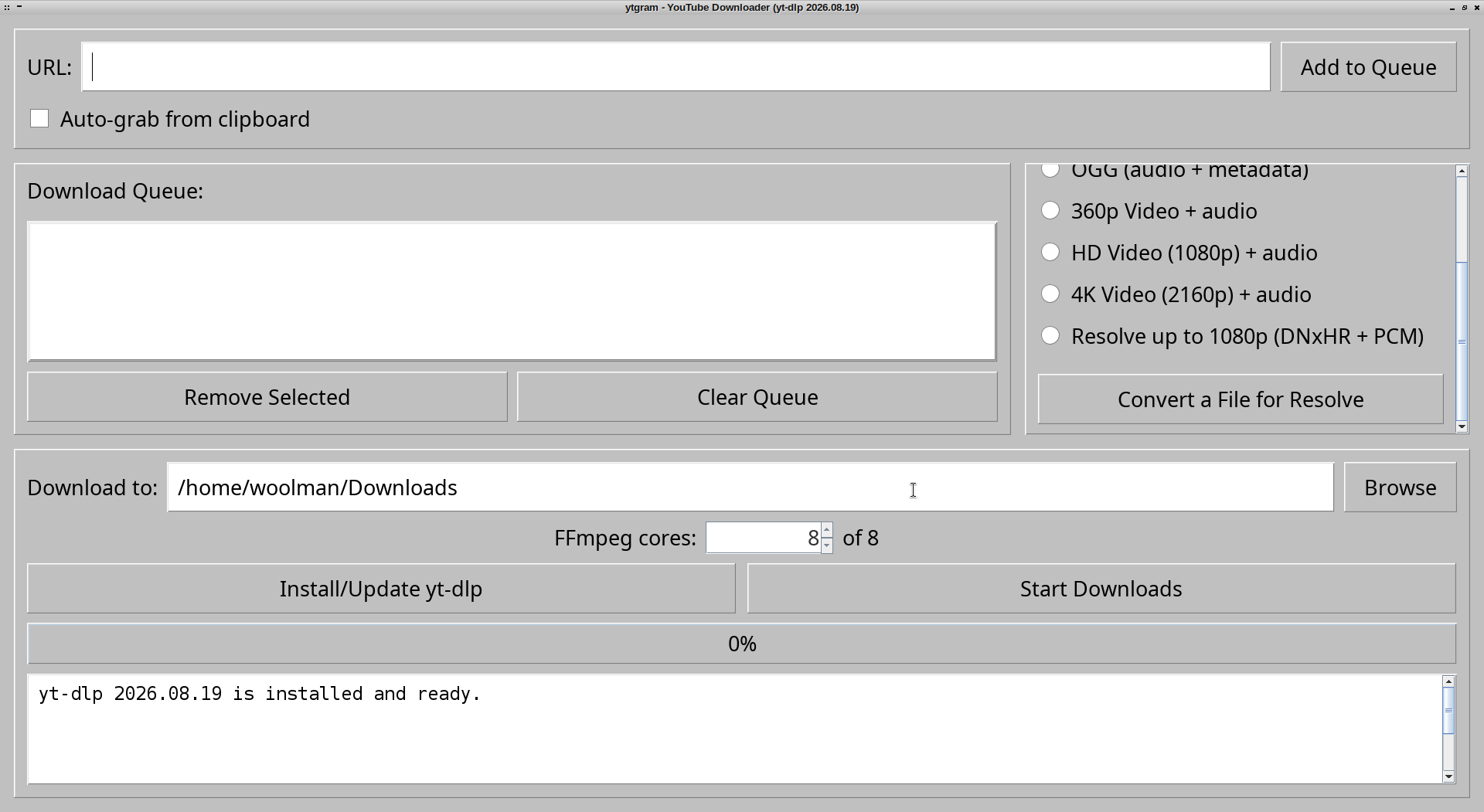
ytgram is a desktop downloader for YouTube and the other sites yt-dlp supports. It queues URLs, saves audio or a single video file, and can write a DaVinci Resolve mezzanine (DNxHR LB picture and PCM audio). The window uses an OS/2-style layout and scales itself to the screen. Settings are remembered in~/.ytgram.properties.
Requirements
- Java 21 or newer
- Debian trixie, or another system that can run the launcher and the
.jar yt-dlp, installed from inside ytgram with pipxffmpeg, for any download that merges picture and sound, and for Resolve conversionpython3andpkexec, used by the Debian package when it installs a missing tool
A normal
apt install of the .deb also installs the recommended ffmpeg and pipx packages.
Install the Debian package
From this directory:bash
./build-deb.sh
sudo apt-get install ./dist/ytgram*all.deb
./build-deb.sh reads the package version from debian/changelog and writes dist/ytgram<version>all.deb. The application described here is ytgram 2.0.
The package installs:
| Path | What it is |
|---|---|
/usr/bin/ytgram | Launcher |
/usr/share/ytgram/ytgram.jar | Program |
/usr/share/applications/ytgram.desktop | Menu entry |
/usr/share/man/man1/ytgram.1.gz | Manual page |
javac is missing, the build script downloads a temporary OpenJDK 21 or 25 compiler. If that copy cannot compile, or if dpkg-dev or debhelper is missing, a password dialog asks to install the system package.
Install for the current user
bash
./build.sh
build/ytgram.jar with javac --release 21 and installs:
~/.local/share/ytgram/ytgram.jar
~/.local/bin/ytgram
~/.local/share/applications/ytgram.desktop
javac for Java 21 has to be on PATH for this script. Use ./build-deb.sh when it is not.
Start ytgram
bash
ytgram
JAVA_HOME, then on PATH, then under /usr/lib/jvm. If none is found and pkexec is available, it asks to install default-jre.
It runs, in order, a ytgram.jar beside the launcher, ~/.local/share/ytgram/ytgram.jar, or /usr/share/ytgram/ytgram.jar. ~/.local/bin is placed on PATH so a desktop session can see the pipx copy of yt-dlp.
On first launch, click Install/Update yt-dlp. That runs pipx install "yt-dlp[default]" for a new install, or pipx runpip yt-dlp install -U "yt-dlp[default]" for an upgrade. The default extra includes the libraries yt-dlp expects, including yt-dlp-ejs. The pipx spec is rewritten so a later pipx upgrade yt-dlp keeps that extra. pipx itself is installed with a password dialog when it is missing. The yt-dlp install stays in the user account (~/.local/bin/yt-dlp).
The window title shows the yt-dlp version once it answers --version.
Download
[download] NN%. The queue is cleared when the run finishes.
Auto-grab from clipboard watches the clipboard and fills the URL field. It does not add the URL to the queue. It recognizes links from YouTube (including Shorts and youtu.be), Vimeo, Dailymotion, Twitter, X, Twitch, TikTok, Instagram, Reddit, Streamable, and SoundCloud. Any other address yt-dlp accepts can still be pasted by hand.
Files are saved as <title>.<extension> in the download folder.
Formats
| Choice | Result |
|---|---|
| MP3, AAC, or OGG | Audio only, with thumbnail and metadata. OGG is Vorbis. |
| 360p Video | Best picture up to 360p, plus the best audio, in one file. |
| HD Video (1080p) | Best picture up to 1080p, plus the best audio, in one file. |
| 4K Video (2160p) | Best picture up to 2160p, plus the best audio, in one file. |
| Resolve up to 1080p | Download up to 1080p, then convert it for DaVinci Resolve. |
ffmpeg and ffprobe in ~/.local/bin. When that copy will not start, a password dialog installs the ffmpeg package.
The same core count is passed to yt-dlp's ffmpeg post-processing.
DaVinci Resolve
The free Resolve build on Linux does not decode H.264 or H.265, and neither the free nor the Studio build decodes AAC. ytgram writes a MOV that both can import:yuv422p
<title>.resolve.mov.
Convert a File for Resolve converts a video that is already on disk. The original stays where it is. The MOV is written beside it as <name>.resolve.mov, at the source height. Frames taller than the cap used by a download are scaled down only for that download path. DNxHR needs even dimensions and at least 256×120, so smaller frames are padded up. Frame rates outside 1–120 fps are written as 30 fps.
The picture encoder uses at most 64 of the cores selected in FFmpeg cores. Decoding and filters use the full selected count. A Resolve file is large; 4K DNxHR is several times the size of the download, which is why the download path stops at 1080p.
Settings
~/.ytgram.properties stores:
| Key | Meaning |
|---|---|
download.directory | Folder chosen with Browse. The first-run default is ~/Downloads. |
clipboard.enabled | Whether clipboard watching is on. |
ffmpeg.threads | Core count. Blank means every logical CPU. |
default.format | Format restored at startup: mp3, aac, ogg, 360p, hd, 4k, or resolve. The first-run default is mp3. |
Build only the jar
bash
./build.sh --compile-only
build/ytgram.jar. Nothing is installed.
License
Copyright 2026 pagetelegram. No license has been stated for this program. The Debian package is built for local installation. The packager is pagetelegram \<jsp@pagetelegram.com\>.Download Options
Free Binaries: Compiled binaries are free to download. Donation suggested.
Source Code: Requires a PayPal donation.
Source Code (Donation-Based)
Compiled Binaries (Free Download)
💛 These binaries are free! If you find this software useful, please consider supporting the developer.
💳 Donate
Debian Linux
Changelog
Changelog
Versions here are the ytgram application. The Debian package revision is the version indebian/changelog, which ./build-deb.sh stamps on the .deb.
2.0 — 2026-09-26
Desktop downloader for yt-dlp, with a queue, saved settings, and a DaVinci Resolve conversion.- Queue URLs and download them one after another. The status log follows yt-dlp, and the progress bar follows its download percentage.
- Watch the clipboard and fill the URL field for YouTube (including Shorts and
youtu.be), Vimeo, Dailymotion, Twitter, X, Twitch, TikTok, Instagram, Reddit, Streamable, and SoundCloud. - Save audio as MP3, AAC, or Ogg Vorbis, with thumbnail and metadata.
- Save video at up to 360p, 1080p, or 2160p. Picture and sound are merged into one MP4 when the codecs fit, otherwise one MKV.
- Download up to 1080p and convert it for DaVinci Resolve: DNxHR LB video and 48 kHz 16-bit stereo PCM in a
.resolve.mov. The intermediate download is removed after the MOV is written. - Convert a video that is already on disk. The original file stays in place, and
<name>.resolve.movis written beside it at the source height. - Choose how many CPU cores ffmpeg may use. The Resolve picture encoder uses at most 64 of them. The count is remembered.
- Remember the download folder and whether clipboard watching is on. A
default.formatentry in~/.ytgram.propertiesrestores the format at startup. - Install and upgrade yt-dlp in the user account with pipx, including the
defaultextra. The pipx spec is kept asyt-dlp[default]so a later upgrade does not drop it. - Ask to install Java 21 (
default-jre), pipx, or ffmpeg when that tool is missing. ffmpeg is copied into~/.local/binfirst; a password dialog is used when a system package has to be installed. - Scale the OS/2-style window to the screen.
- Build a per-user install with
./build.sh, or a Debian trixie package with./build-deb.sh. The package script can compile with a temporary JDK whenjavacis not installed. - First Debian package for trixie (
1.0.0-1): the desktop program, launcher, menu entry, and manual page.