 PassGram (WWW/PHP)
PassGram (WWW/PHP)
Current Version: 3.0.0
67
Unique Views
6
Free Downloads
0
Donation Downloads
PassGram v3.0
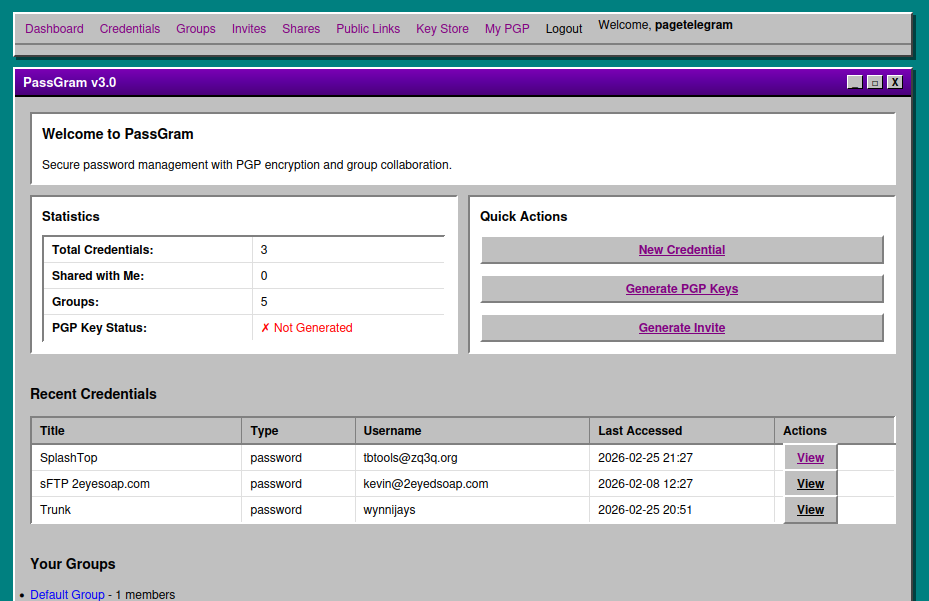
Secure Password Manager with PGP Key Store, Public Key Directory, Group Collaboration & Per-User PGP Encryption Mode PassGram is a standalone PHP password manager featuring group-based credential sharing, a PGP public key store with optional public directory listing, PGP encryption using native PHP OpenSSL, encrypted JSON file storage, and an invite-only registration system. All styled with an authentic OS/2 Warp 3.0 interface with purple title bars.Features
Core Functionality
- Encrypted Password Storage - AES-256-GCM encryption for all credentials
- Group Collaboration - Users belong to groups and can share credentials and PGP keys
- Complete Group Management - Create, edit, delete groups, add/remove members, transfer ownership
- Group-Level Credential Sharing - Share credentials with entire groups (read-only or read/write permissions)
- PGP Key Store - Import, store, and share public PGP keys with groups (just like credentials)
- Public PGP Key Directory - Optionally list public keys in an unauthenticated searchable directory
- PGP Key Management - Generate RSA, DSA, or Elliptic Curve keys with configurable sizes
- Cross-User Credential Access - Group members can view and edit shared credentials across user boundaries
- Copy Password from List - Copy passwords to clipboard directly from the credential list via AJAX
- Group Assignment at Creation - Assign credentials and PGP keys to groups at creation time
- Credential Sharing - Share passwords with group members using PGP encryption
- Invite-Only Registration - Secure invite codes tied to specific groups
- Notes System - Add notes to users (group-visible) and credentials (private)
- Multi-Field Credentials - Store passwords, usernames, URLs, custom fields, tags
- Password Generator - Built-in secure random password generator
- Copy-to-Clipboard - One-click copying for credentials, invites, URLs, PGP keys, and fingerprints
- Persistent Navigation - Dashboard menu accessible on all pages when logged in
- Import Public Keys - Paste PEM-encoded public keys (RSA, DSA, EC)
- Key Metadata - Label, owner name, owner email, fingerprint, algorithm, key bits
- Group Sharing - Share PGP keys with groups, same pattern as credential sharing
- Cross-User Access - Group members can view keys shared by other users
- Public Directory Listing - Optionally make keys visible to unauthenticated visitors
- Search & Filter - Client-side search by name, email, label, or fingerprint
- Copy to Clipboard - Copy full public key text or fingerprint with one click
- Download Keys - Download public keys as .pem files
- Unauthenticated Access - No login required to browse publicly listed keys
- Search & Filter - Real-time client-side filtering by name, email, label, or fingerprint
- Copy Key - Copy the full PGP public key to clipboard
- Copy Fingerprint - Copy key fingerprint to clipboard
- Privacy Controls - Only owner name, email, label, fingerprint, algorithm, and public key are exposed; notes, tags, and group info are never published
- Accessible from Login Page - Link on the login page for easy discovery
- Master Application Key (MAK) - Encrypts all JSON database files
- User Master Password - Never stored, only hashed (bcrypt + Argon2id)
- Field-Level Encryption - Sensitive credential fields encrypted individually
- PGP Public Key Cryptography - For secure credential sharing between users
- CSRF Protection - All state-changing operations protected
- Rate Limiting - Brute force protection on authentication
- Session Security - Secure, httponly, samesite cookies
- Comprehensive Logging - Audit trail of all security events
- OS/2 Warp 3.0 Theme - Authentic purple title bars (#5D009D), beveled borders, classic gray backgrounds
- Server-Side Rendered - Traditional PHP approach, works without JavaScript
- Enhanced User Experience - Copy buttons, show/hide passwords, dynamic forms
- Responsive Design - Works on desktop and mobile devices
- PHP 7.4+ (PHP 8.x recommended)
- OpenSSL Extension (standard on all servers)
- JSON Extension (standard on all servers)
- Writable
data/directory for encrypted storage - HTTPS (required for production - configured in web server)
PGP Key Store (Added in v2.0)
Public PGP Key Directory (Added in v2.0)
Security Features
User Interface
System Requirements
Installation
1. Upload Files
Transfer all PassGram files to your web server. Thepublic/ directory should be your web root.
your-domain.com/
├── public/          <- Point your web server here
├── src/
├── data/
├── config/
├── autoload.php
└── install.php
2. Set Permissions
bash
chmod 700 data/
chmod 700 config/
chmod 644 public/.htaccess
3. Run Installation
Visithttps://your-domain.com/install.php in your browser.
The installer will:
config/security.php to a secure location
install.php after successful installation
4. Configure Web Server
Apache (.htaccess already included): Point DocumentRoot to/public/ directory.
Nginx:
nginx
server {
    listen 443 ssl;
    server_name your-domain.com;

    root /path/to/passgram/v3.0/public;
    index index.php;

    location / {
        tryfiles $uri $uri/ /index.php?$querystring;
    }

    location ~ \.php$ {
        fastcgi_pass unix:/var/run/php/php8.1-fpm.sock;
        fastcgi_index index.php;
        include fastcgi_params;
    }

    # Block access to sensitive directories
    location ~ ^/(config|data|src)/ {
        deny all;
    }
}
5. Update Configuration
Editconfig/config.php:
base_url to your domain
cookie_secure when using HTTPS
Directory Structure
v3.0/
├── autoload.php                 # Standalone PSR-4 autoloader
├── install.php                  # Installation script (delete after install)
├── public/                      # Web root
│   ├── index.php               # Main entry point & router
│   ├── login.php               # Login page
│   ├── logout.php              # Logout handler
│   ├── register.php            # Invite-based registration
│   ├── assets/
│   │   ├── css/style.css       # OS/2 Warp 3.0 theme
│   │   └── js/app.js           # Client-side interactions
│   └── .htaccess               # Apache security & rewrite rules
├── src/                         # Application code
│   ├── Core/                   # Core infrastructure
│   │   ├── Config.php          # Configuration loader
│   │   ├── Database.php        # Encrypted JSON file operations (AES + PGP mode)
│   │   └── Session.php         # Secure session management
│   ├── Security/               # Security components
│   │   ├── Encryption.php      # AES-256-GCM encryption
│   │   ├── PGP.php             # Native PHP OpenSSL RSA/DSA/EC key generation
│   │   ├── PGPEncryption.php   # Hybrid RSA+AES-256-GCM per-user encryption (v3.0)
│   │   ├── Auth.php            # Authentication
│   │   └── CSRF.php            # CSRF protection
│   ├── Models/                 # Data models
│   │   ├── User.php            # User management + PGP encryption mode setting
│   │   ├── Group.php           # Group management
│   │   ├── Invite.php          # Invite code system
│   │   ├── Credential.php      # Password storage + cross-user access
│   │   ├── PGPKey.php          # PGP key store + public catalog sync
│   │   ├── Share.php           # PGP-encrypted sharing
│   │   └── Note.php            # Notes system
│   ├── Controllers/            # Request handlers
│   │   ├── AuthController.php
│   │   ├── DashboardController.php
│   │   ├── CredentialController.php
│   │   ├── GroupController.php
│   │   ├── InviteController.php
│   │   ├── PGPController.php         # Key generation + encryption mode toggle (v3.0)
│   │   ├── PGPKeyController.php      # Key Store CRUD + group sharing
│   │   ├── PublicKeyController.php   # Unauthenticated public directory
│   │   ├── ShareController.php
│   │   └── NoteController.php
│   ├── Views/                  # PHP templates
│   │   ├── layouts/            # header.php, footer.php, navigation.php
│   │   ├── auth/               # login.php, register.php
│   │   ├── dashboard/          # index.php
│   │   ├── credentials/        # list, view, create, edit
│   │   ├── pgpkeys/            # list, view, create, edit
│   │   ├── public/             # keys.php (unauthenticated directory)
│   │   ├── groups/             # list, view, create, edit
│   │   ├── invites/            # list
│   │   ├── pgp/                # view (with encryption mode toggle), generate
│   │   └── shares/             # list, view
│   └── Helpers/                # Utility classes
│       ├── Validator.php       # Input validation
│       ├── Sanitizer.php       # XSS prevention
│       └── Logger.php          # Activity logging
├── data/                        # Encrypted storage (outside web root)
│   ├── users.json.enc          # Encrypted user database
│   ├── groups.json.enc         # Encrypted groups
│   ├── invites.json.enc        # Encrypted invites
│   ├── credentials/            # Per-user credential files
│   │   ├── {userId}.json.enc   #   AES mode  – master application key
│   │   └── {userId}.pgp.enc    #   PGP mode  – user's own RSA/EC key pair
│   ├── pgpkeys/                # Per-user PGP public-key stores
│   │   ├── {userId}.json.enc   #   AES mode  – master application key
│   │   ├── {userId}.json       #   PGP mode  – plain JSON (public keys need no encryption)
│   │   └── public_catalog.json.enc  # Shared public key catalog
│   ├── shares/                 # Shared credential metadata
│   ├── notes/                  # Notes storage
│   ├── pgp/                    # Personal PGP key pairs
│   │   ├── {userId}_public.key     # PEM public key
│   │   └── {userId}_private.key.enc # Passphrase-protected private key
│   └── logs/                   # Activity logs
└── config/                      # Configuration files
    ├── config.php              # Main configuration
    ├── database.php            # Storage paths
    └── security.php            # Master key & crypto settings
Usage
First Steps
Credential Types
PassGram supports multiple credential types:Sharing Credentials with Groups
PGP Key Store
Public PGP Key Directory
/index.php?page=keys without logging in
Managing Groups
As a group owner, you can:PGP Key Options
When generating PGP keys, choose from multiple encryption algorithms: RSA (Recommended)Security Considerations
Master Application Key (MAK)
config/security.php securely offline
User Master Password
Public Key Directory
HTTPS
Always use HTTPS in production. Password managers should never run over HTTP.Backups
Backup these regularly:config/security.php - Contains MAK
data/ directory - All encrypted data
Technical Details
No Dependencies
PassGram is completely standalone:Encryption Architecture
Layer 1: Master Application Key{userId}.pgp.enc | Public keys: {userId}.json (plain)
Data Storage
All data stored in encrypted JSON files:Known Limitations
Browser Compatibility
License
PassGram v3.0 - Copyright 2025-2026 Jason Page / Amfile.orgDeveloper
Developed by Jason Page of Amfile.org. For issues, questions, or contributions, please contact the developer. --- PassGram v3.0 - Secure. Simple. Standalone.Download Options
Free Download: Source code and changelog are freely available below.
Compiled Versions: Support development with a donation via PayPal to receive compiled binaries.
Compiled Versions: Support development with a donation via PayPal to receive compiled binaries.
Free Downloads
📦 Download Source CodeChangelog
Changelog
All notable changes to PassGram will be documented in this file. The format is based on Keep a Changelog, and this project adheres to Semantic Versioning.[3.0] - 2026-02-25
Added
#### Per-User PGP Encryption Mode- PGP Encryption Mode Toggle - Switch per-user credential and public-key storage from the shared master application key to the user's own PGP key pair
- Hybrid RSA+AES-256-GCM - New
PGPEncryptionclass encrypts a random 256-bit AES session key with the user's RSA/EC public key (OAEP padding), then encrypts data with AES-256-GCM; bundle stored as base64-encoded JSON envelope - Session Passphrase Unlock - User enters PGP passphrase once per session; verified against stored private key blob and held server-side in
$SESSION['pgppassphrase']; cleared on logout - Lock/Unlock Controls - Explicit lock button to clear passphrase from session; unlock form to re-enter it
- Data Migration - Toggle action migrates existing files between formats: AES
.json.enc↔ PGP.pgp.enc(credentials) and AES.json.enc↔ plain.json(public keys); old file deleted on success - User-ID-Scoped Context - PGP context is owner-ID-aware so other users' files (e.g. group-shared credentials) are always read/written in AES mode, preserving group sharing functionality
- Passphrase Verification -
PGPEncryption::verifyPassphrase()validates passphrase before storing in session
#### New Storage Formats (PGP mode)
data/credentials/{userId}.pgp.enc- RSA+AES-256-GCM encrypted credentials filedata/pgpkeys/{userId}.json- Plain JSON public-key store (public keys need no encryption)- Version strings - Updated all title bars, page titles, PHP comments, config version field, and asset headers from v2.50/v2.00 to v3.0
src/Core/Database.php- AddedsetPGPContext(),clearPGPContext(),hasPGPContext(),pgpContextAppliesTo(), PGP-mode read/write helpers, and migration methodssrc/Models/User.php- AddedsetPGPEncryptionMode(userId, bool)to togglesettings.pgpencryptionmodesrc/Controllers/PGPController.php- AddedunlockPGP(),lockPGP(),toggleEncryption()actionssrc/Views/pgp/view.php- Added encryption mode section with passphrase unlock form, mode toggle button, and storage format reference tableindex.php- Added PGP context injection block after auth check; added routesunlock-pgp,lock-pgp,toggle-encryptionconfig/config.php-versionkey updated to'3.0'src/Security/PGPEncryption.php- Hybrid RSA+AES-256-GCM encryption class withencrypt(),decrypt(),encryptData(),decryptData(),verifyPassphrase()
---
- Import Public Keys - Paste PEM-encoded public keys (RSA, DSA, EC) into a personal key store
- Key Metadata - Store label, owner name, owner email with auto-extracted fingerprint, algorithm, and key bits
- Group Sharing - Share PGP keys with groups using the same pattern as credential sharing (read-only or read/write)
- Cross-User Key Access - Group members can view keys shared by other users across user boundaries
- Tags & Notes - Attach tags and private notes to stored keys
- Full CRUD - Create, view, edit, and delete stored PGP keys
- Copy & Download - Copy public key text or fingerprint to clipboard; download keys as .pem files #### Public PGP Key Directory
- Unauthenticated Access - Browse publicly listed keys without logging in (
/index.php?page=keys) - Opt-In Public Listing - Key owners toggle "List this key in the public directory" checkbox on create/edit
- Real-Time Search - Client-side filtering by name, email, label, or fingerprint
- Copy Key - Copy the full PGP public key text to clipboard from the directory
- Copy Fingerprint - Copy key fingerprint to clipboard
- Privacy Controls - Only safe fields published (label, owner name, email, fingerprint, algorithm, key bits, public key text); notes, tags, and group info are never exposed
- Shared Catalog - Efficient
public_catalog.json.encfile synced automatically on create/edit/delete; public page never touches per-user files - Login Page Link - Directory linked from the login page for easy discovery #### Cross-User Credential Access (ported from v1.02)
findByIdAcrossUsers()- Group members can now view and edit credentials owned by other users when shared via groups- Ownership-Aware UI - Credential view page shows access level (read-only/read-write) and ownership status
- Correct Encryption Key - Uses the credential owner's encryption key for decryption, not the viewing user's #### Copy Password from List (ported from v1.02)
- Copy Pwd Button - Copy passwords to clipboard directly from the credentials list view via AJAX
getPasswordEndpoint - Secure on-demand password decryption endpoint with cross-user support- No Page Reload - Uses fetch API for seamless clipboard copy without navigation #### Group Assignment at Creation (ported from v1.02)
- Group Selection on Create - Assign credentials to groups at creation time with multi-select
- Permission Level - Choose read-only or read/write when assigning groups during creation
- Immediate Sharing - Groups are assigned right after credential creation in a single workflow
- Version Strings - Updated all title bars and page titles from v1.00 to v2.00
- Login Page - Added link to Public PGP Key Directory
- Router - Added
keysto public pages array; addedpgpkeysandkeysroute cases - Directory Structure - Added
data/pgpkeys/for per-user PGP key files andpublic_catalog.json.enc src/Models/PGPKey.php- PGP key store data model with catalog syncsrc/Controllers/PGPKeyController.php- Key Store CRUD + group sharing controllersrc/Controllers/PublicKeyController.php- Unauthenticated public directory controllersrc/Views/pgpkeys/list.php- Key Store list viewsrc/Views/pgpkeys/view.php- Key Store detail viewsrc/Views/pgpkeys/create.php- Import PGP key form with public listing checkboxsrc/Views/pgpkeys/edit.php- Edit PGP key form with public listing checkboxsrc/Views/public/keys.php- Self-contained public directory page with search and copy
---
- Encrypted Password Storage - AES-256-GCM encryption for all credentials
- Group Collaboration - Users belong to groups and can share credentials
- PGP Key Management - Generate and manage encryption keys
- Invite-Only Registration - Secure invite codes tied to specific groups
- Notes System - User notes (group-visible) and credential notes (private)
- Multi-Field Credentials - Store passwords, usernames, URLs, custom fields, tags
- Password Generator - Built-in secure random password generator #### Group Management (Complete CRUD)
- Create new groups with name and description
- Edit existing groups (name, description)
- Delete groups (with confirmation, owner only)
- Add members to groups by username
- Remove members from groups (with confirmation)
- Transfer group ownership to another member
- View all group members with roles
- List all user's groups #### Group-Level Credential Sharing
- Share credentials with entire groups (not just individuals)
- Permission levels: - Read Only - Members can view the credential - Read & Write - Members can view and edit the credential
- Revoke group access instantly
- View which groups have access to each credential
- Credentials list shows ownership status (Owner/Shared)
- Credentials list shows access level for shared items #### PGP Encryption Options
- Multiple Algorithms: - RSA - 2048, 3072, or 4096 bits (recommended) - DSA - 2048, 3072, or 4096 bits (legacy) - Elliptic Curve - secp384r1, secp521r1, prime256v1 (modern)
- Dynamic form with algorithm selection
- Real-time security level display
- Algorithm and key size stored with user record
- PGP view page displays actual algorithm used
- Educational information about each algorithm #### User Experience Enhancements
- Copy-to-Clipboard Buttons throughout application: - Invite codes (both code and full registration URL) - Credential usernames - Credential passwords - Credential URLs - PGP public keys - PGP fingerprints
- Persistent Navigation Menu - Dashboard menu accessible on all pages when logged in
- Show/Hide Passwords - Toggle password visibility in credential view
- Dynamic Forms - PGP generation form updates based on algorithm selection
- Improved Layouts - Flexbox layouts for better button placement #### Security Infrastructure
- Master Application Key (MAK) - Encrypts all JSON database files with AES-256-GCM
- User Master Password - Never stored, only hashed (bcrypt for auth, Argon2id for key derivation)
- Field-Level Encryption - Sensitive credential fields encrypted individually
- PGP Public Key Cryptography - For secure credential sharing between users
- CSRF Protection - All state-changing operations protected with tokens
- Session Security - Secure, httponly, samesite=strict cookies with 60-minute timeout
- Comprehensive Logging - Audit trail of all security events and admin actions
- Input Validation - All user input validated and sanitized
- XSS Prevention - htmlspecialchars() used on all output #### Core Infrastructure
- Standalone PSR-4 Autoloader - No Composer required
- Config System - Hierarchical configuration with environment support
- Database Layer - Encrypted JSON file operations with atomic writes
- Session Management - Secure PHP sessions with static helper class
- Authentication System - Password hashing, session management, user verification
- Encryption Class - AES-256-GCM with Argon2id key derivation
- PGP Class - Native PHP OpenSSL for RSA/DSA/EC operations
- CSRF Protection - Token generation and validation
- Validator - Email, username, password validation with error handling
- Sanitizer - XSS prevention and input cleaning
- Logger - File-based activity logging with levels #### Data Models
- User Model - Create, read, update, delete users; password management; group membership; PGP key info
- Group Model - Full CRUD operations; member management; ownership transfer
- Credential Model - Full CRUD; group sharing; permission checking; accessible credentials
- Invite Model - Generate invite codes; validate; track usage
- Share Model - PGP-encrypted credential sharing between users
- Note Model - User notes and credential notes #### Controllers
- AuthController - Login, registration, logout, session management
- DashboardController - Main dashboard with statistics and quick actions
- CredentialController - Full CRUD operations plus group sharing/revoking
- GroupController - Complete group management including transfer ownership
- InviteController - Generate and list invite codes
- PGPController - Generate keys with multiple algorithms, view keys
- ShareController - Share credentials with PGP encryption
- NoteController - Manage user and credential notes #### Views (OS/2 Warp 3.0 Styled)
- Layouts - Header with persistent navigation, footer
- Authentication - Login, register pages with OS/2 styling
- Dashboard - Overview with quick stats and action buttons
- Credentials - List (with filtering), view, create, edit pages
- Groups - List, view (with member management), create, edit pages
- Invites - List with generation form and copy buttons
- PGP - Generate (with algorithm options), view (with copy/download)
- Notes - Forms for user and credential notes #### User Interface
- OS/2 Warp 3.0 Theme: - Purple title bars (#5D009D) - Beveled borders (3D effect with outset/inset) - Classic gray backgrounds (#C0C0C0) - System fonts (monospace for code) - Classic button styles with :active states - Window-style containers - Traditional form controls
- Responsive Design - Works on desktop and mobile
- JavaScript Enhancements: - Copy-to-clipboard with notifications - Show/hide password functionality - Dynamic form updates (PGP generation) - Notification system (success/error messages) #### Installation
- install.php - Interactive installation wizard with OS/2 styling
- Generates Master Application Key
- Creates first admin user
- Creates default group
- Generates first invite code
- Initializes encrypted database structure #### Configuration
- config/config.php - Main application configuration
- config/database.php - Storage paths configuration
- config/security.php - Master key and crypto settings (generated by installer)
- .htaccess - Apache security headers and rewrite rules #### Documentation
- README.md - Comprehensive documentation with installation, usage, security considerations
- CHANGELOG.md - This file, documenting all changes
- Inline Comments - PHP docblocks on all classes and methods
- Master Application Key - All JSON files encrypted at rest
- User Master Password - Derives keys for private PGP key encryption
- PGP Encryption - For credential sharing between users
- Field-Level - Sensitive credential fields encrypted individually #### Password Security
- Authentication: bcrypt hash (cost factor 12)
- Key Derivation: Argon2id (memory: 65536 KB, time: 4, threads: 2)
- Never stored in plain text anywhere
- 12+ character minimum with complexity requirements #### Data Storage
- All data in encrypted JSON files
- No SQL database required or used
- Atomic write operations with file locking
- Per-user credential files for scalability
- Proper file permissions (700 for data/, 600 for sensitive files)
- PHP 7.4+ (PHP 8.x recommended)
- OpenSSL extension (standard)
- JSON extension (standard)
- Writable data/ directory
- HTTPS (required for production) #### No External Dependencies
- No Composer packages
- No npm packages
- Pure PHP implementation
- Native OpenSSL for cryptography
- Standalone autoloader included #### File Structure
Changed
New Files
[2.00] - 2026-02-13
Added
#### PGP Key StoreChanged
New Files
[1.00] - 2025-12-20
Initial Release
PassGram v1.00 is a complete, production-ready password manager with group collaboration, PGP encryption, and OS/2 Warp 3.0 styling.Added
#### Core FeaturesSecurity Considerations
#### Encryption LayersTechnical Details
#### Requirements
v3.0/
├── autoload.php
├── install.php
├── public/
│   ├── index.php
│   ├── login.php
│   ├── logout.php
│   ├── assets/
│   │   ├── css/style.css
│   │   └── js/app.js
│   └── .htaccess
├── src/
│   ├── Core/
│   ├── Security/
│   ├── Models/
│   ├── Controllers/
│   ├── Views/
│   └── Helpers/
├── data/
│   ├── users.json.enc
│   ├── groups.json.enc
│   ├── invites.json.enc
│   ├── credentials/
│   ├── shares/
│   ├── notes/
│   ├── pgp/
│   └── logs/
└── config/
    ├── config.php
    ├── database.php
    └── security.php