 Radiogram
Radiogram

💛 Support Page Telegram directly
💳 Donate
Current Version: 1.0.0a
24
Unique Views
12
Free Downloads
0
Donation Downloads
RadioGram
Console Radio Broadcast Management System Version: 1.0a Author: Jason Page Started: Thanksgiving Day 2020 License: GPL-3+Overview
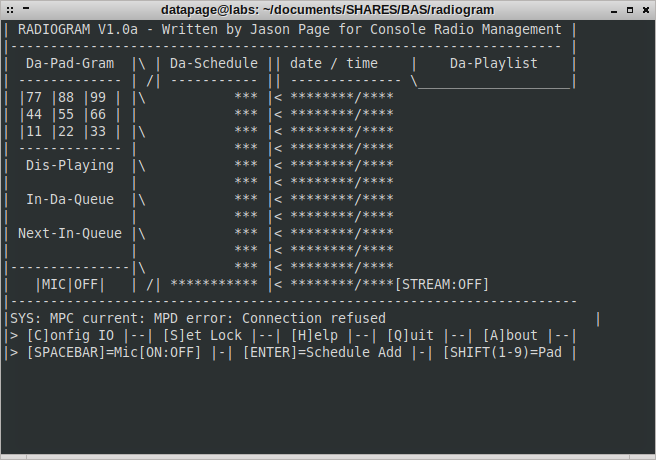
RadioGram is a comprehensive radio broadcast system designed for console Linux environments. It provides professional radio automation capabilities including music rotation, scheduling, live input, and streaming - all from a text-based interface.Features
- Automated Music Rotation - Uses MPD (Music Player Daemon) for playlist management
- Scheduler - Schedule content to play at specific dates and times
- Sound Pad - 0-9 programmable pads for live sound effects
- Live Microphone - Space bar toggles microphone input on/off
- Streaming - Built-in Icecast/Shoutcast encoder support
- Rotation System - Automatic jingle and commercial insertion
- Device Selection - Choose input/output audio devices on the fly
- MPD Configuration - Full control over MPD connection settings
- Ensure MPD is running:
Quick Start
bash
   systemctl --user start mpd
bash
   radiogram
Installation
From .deb Package
bash
sudo dpkg -i radiogram1.0aamd64.deb
sudo apt-get install -f  # Install dependencies if needed
Dependencies
mpd - Music Player Daemon
mpc - MPD command-line client
mpv - Media player
ffmpeg - Audio encoding for streaming
alsa-utils - Audio device utilities
Configuration Files
RadioGram stores configuration in the current working directory:Keyboard Controls
| Key | Action |
|---|---|
SPACE | Toggle microphone on/off |
ENTER | Add scheduled content |
1-9 | Play sound pad 1-9 |
SHIFT+1-9 | Program sound pad 1-9 |
ALT+1-9 | Preview sound pad 1-9 |
C | Configuration menu |
R | Rotation/shuffle configuration |
E | Toggle streaming encoder |
S | Set/remove config lock |
H | Help |
A | About |
Q or ESC | Quit program |
UP/DOWN | Change output device |
LEFT/RIGHT | Change input device |
MPD Setup
RadioGram requires MPD (Music Player Daemon) to be installed and running.bash
sudo apt install mpd mpc
~/.config/mpd/mpd.conf or /etc/mpd.conf)
bash
   systemctl --user enable --now mpd
Streaming Setup
To stream to an Icecast/Shoutcast server:Rotation/Shuffle Mode
To set up automatic music rotation with jingles and commercials:Supported Audio Formats
Troubleshooting
If you encounter issues:mpc status
arecord -L and aplay -L
/tmp/radiogram_*.err files for error details
Tips
Contact
Author: Jason Page Email: jsp@pagetelegram.com Source: https://github.com/pagetelegram/radiogramLicense
RadioGram is free software licensed under the GNU General Public License version 3 or later (GPL-3+). See/usr/share/doc/radiogram/copyright for full license information.
---
RadioGram - Professional radio automation for the consoleDownload Options
Free Binaries: Compiled binaries are free to download. Donation suggested.
Source Code: Requires a PayPal donation.
Source Code (Donation-Based)
Compiled Binaries (Free Download)
💛 These binaries are free! If you find this software useful, please consider supporting the developer.
💳 Donate
Debian Linux
Changelog
Changelog
All notable changes to RadioGram will be documented in this file. The format is based on Keep a Changelog.[1.0a] - 2025-11-23
Added
- Initial alpha release of RadioGram
- Automated music rotation using MPD (Music Player Daemon)
- Scheduler system for timed content playback - Date/time based scheduling with MM-DD-YYYY HH:MM:SS format - Automatic queue management
- Sound pad system (0-9) for live sound effects - Browse and program sound pads - Preview functionality (ALT+1-9) - Support for MP3, WAV, OGG, FLAC, M4A formats
- Live microphone input with toggle control - Space bar for quick on/off - Device selection support
- Streaming capabilities - Icecast/Shoutcast encoder support via ffmpeg - Configurable bitrate - Automatic reconnection on stream failure
- Advanced rotation/shuffle mode - Automatic jingle insertion at configurable intervals - Automatic commercial insertion at configurable intervals - Recursive music library scanning - Fisher-Yates shuffle algorithm
- Audio device management - Dynamic input device selection - Dynamic output device selection - Arrow key navigation for quick device switching
- MPD configuration - Custom host and port configuration - Remote MPD server support - Music directory path configuration
- Configuration management - Password-protected configuration lock - Persistent configuration storage - Multiple configuration files (cfg, sch, pad, lst)
- User interface - Full-screen console interface - Real-time status display - System message/error reporting - Help system with keyboard shortcuts
- Error handling and logging - Comprehensive error file logging in /tmp - User-friendly error messages - Automatic cleanup of old error files
- Written in FreeBASIC
- Uses ALSA for audio device management
- Integration with MPD/MPC for playlist management
- Integration with MPV for sound pad playback
- FFmpeg-based streaming encoder
- Supports both local and remote MPD servers
radiogram.cfg- Main configurationradiogram.sch- Scheduler entriesradiogram.pad- Sound pad mappingsradiogram.lst- Current playlist file path- Default pads directory:
~/Music/pads/ - mpd - Music Player Daemon
- mpc - MPD command-line client
- mpv - Media player for sound pads
- ffmpeg - Audio encoding for streaming
- alsa-utils - Audio device utilities
- Maximum 255 scheduled entries
- Maximum 500 shuffled tracks
- Maximum 50 jingles
- Maximum 100 commercials
- Maximum 50 input/output devices
- Sound pad preview displays for 2 seconds
- Full radio automation capabilities
- Professional-grade scheduler
- Live mixing with sound pads and microphone
- Streaming support for Icecast/Shoutcast
- Advanced rotation system with jingle/commercial insertion Target Users:
- Internet radio broadcasters
- Community radio stations
- Podcast producers
- Amateur radio enthusiasts
- Anyone needing automated audio playback with live mixing Next Steps:
- Gather user feedback
- Bug fixes and stability improvements
- Additional features based on community requests